On this page
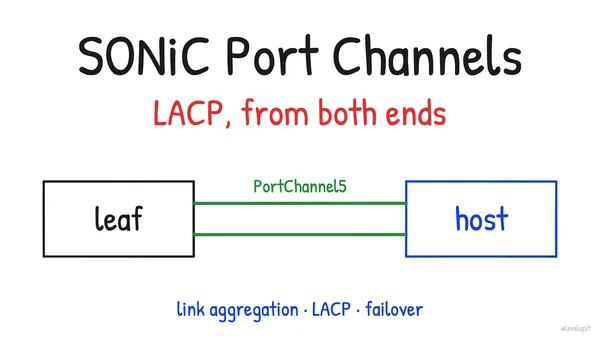
A host has two cables to the same switch, for the obvious reasons: more capacity, and it should not go offline because one cable was pulled. But two separate links between the same two devices are not twice the network. To a switch they are a loop, or two ports that lead to the same address. The two cables have to be presented as one link. That is link aggregation, and the protocol that negotiates it is LACP. This post builds a port channel on a SONiC switch toward a host that is already asking for one, reads the negotiation from both ends, looks at the frames, and takes one cable away while traffic is running. The switches run Enterprise SONiC 4.6.0; the same steps follow on community SONiC.
This is the written deep dive for lesson 5 of the SONiC course on the LevelUP I.T. YouTube channel. It runs on the lab built in lesson 1. Every output below is from the lab as the lesson recorded it.
What you'll find here
- What link aggregation gives the rest of the switch: one interface, and a hash that picks a member per flow.
- Why a bundle is negotiated: what LACP sends on every member, and the two things it protects against.
- The host's bond before and after: a partner address of all zeros, then the switch's.
- Building the port channel, and reading
show interface PortChannel: actor and partner per member. - LACP frames captured on a member.
- A VLAN and a gateway on the port channel; the records in CONFIG_DB; teamd.
- One member shut down while a ping runs, and why packets are lost on a virtual cable.
- The community SONiC command set for the same steps.