
On this page
This is part 6 of a series on learning F5 BIG-IP Local Traffic Manager on a real data-centre fabric running on SONiC switches. Each part goes with a video on the LevelUP I.T. YouTube channel. Part 5 measured the load-balancing methods. This part covers the other half of that decision: health monitors, which decide which members the method may choose.
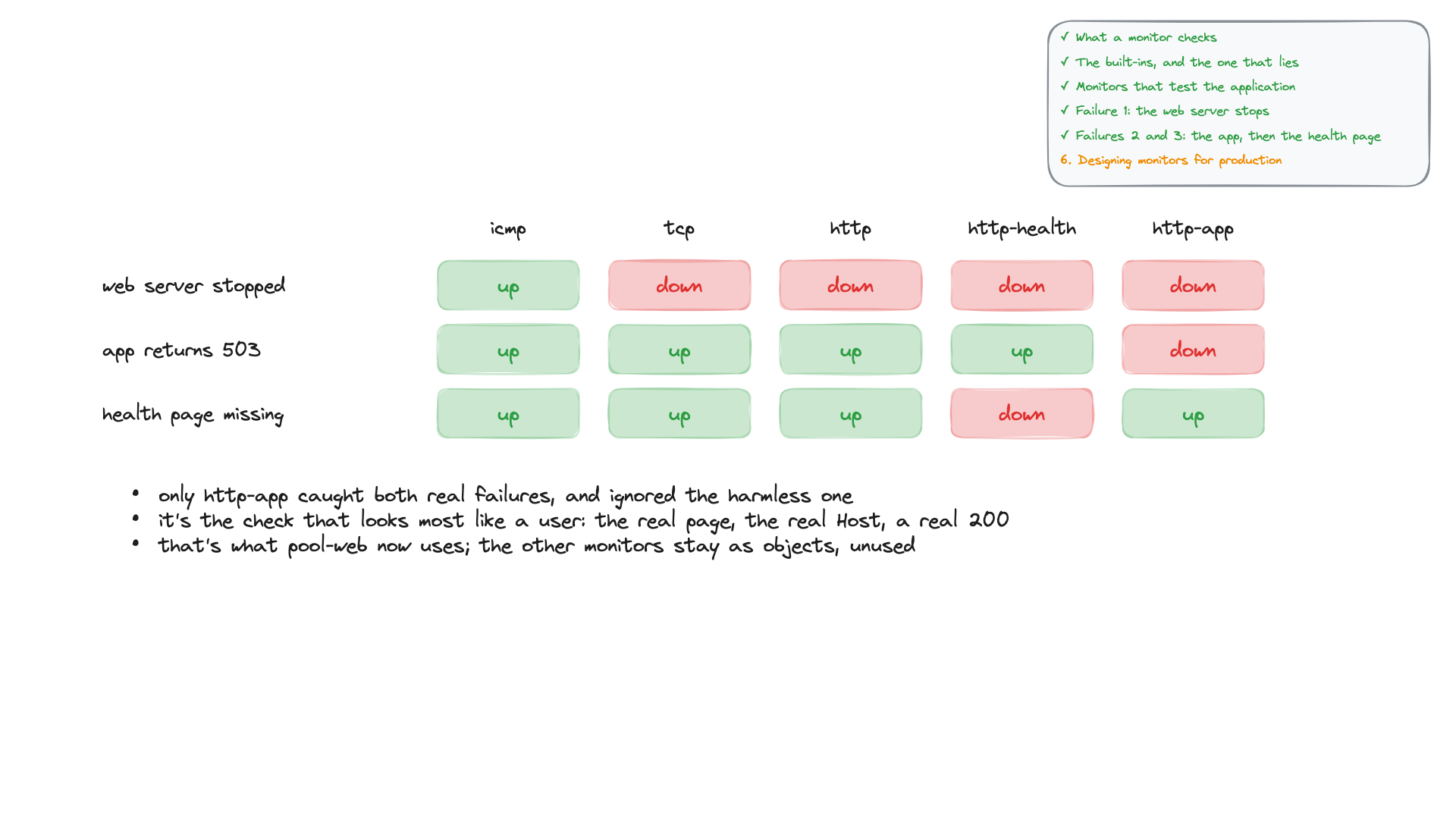
I broke one server three different ways and watched five health monitors at the same time. When the web server stopped, every monitor caught it except ping. When the application returned errors while the server kept running, only one monitor noticed. When the health page disappeared while the application worked, a healthy server was taken out of the pool. This part explains what each monitor actually checks, and how to design monitors that catch the failures users feel.
What you'll see
- What a monitor is: who asks, how often, what it decides, and what it never measures.
- Address, service, content and interactive checks, and node, pool and member monitors.
- The built-in http monitor read line by line, and why
recv nonemakes it lie. - Two custom monitors: one built in the web UI, one in tmsh.
- Three failures on server2, each monitor's verdict timed, and the log line that explains it.
- Timers, monitor load, recovery and slow ramp, health-page design, and a production checklist.
What a monitor checks
A monitor is a question the BIG-IP keeps asking every member. It is asked from the BIG-IP's own self IP (10.20.0.241 here), every interval (5 s by default), and the answer must arrive within the timeout (16 s). If the member passes it is eligible for new connections; if it fails, the method skips it. A monitor never measures speed: part 5's slow server stayed up.
There are four kinds of check, each answering a narrower question than "does the application work?":
- Address check (ICMP): does the host answer ping?
- Service check (TCP): does the port accept a connection?
- Content check: does a request return the expected text?
- Interactive check: a real send/receive exchange, for HTTP, FTP, SMTP and others.