On this page
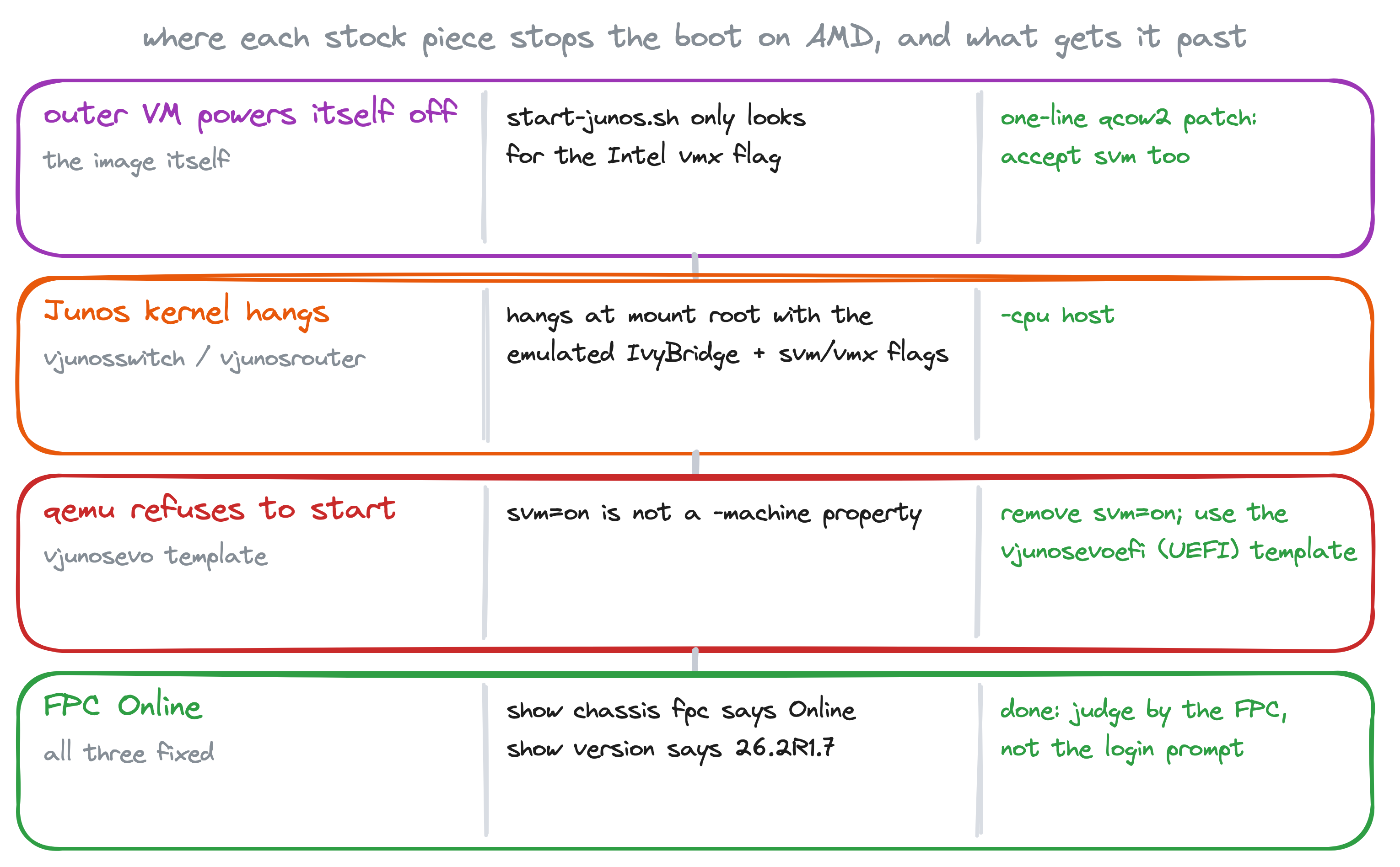
The vJunos images assume Intel: the launcher inside vJunos-switch and vJunos-router literally checks for the Intel virtualization flag, and EVE-NG's AMD node templates were written for other hardware. Put the 26.2R1.7 qcow2s on an AMD EPYC box running EVE-NG PRO and the switch and router power themselves off; patch that and they hang at mount root; and vJunosEvolved on the default AMD template never starts QEMU at all. The fixes are small, but they live in two places (the image and the node templates) and it takes four edits to get all three platforms up. This is the complete list, each one reproduced and verified on an EPYC 9575F.
Tested on: AMD EPYC 9575F (Zen 5), EVE-NG PRO, QEMU 5.2.0 (the version the vJunos templates pin), vJunos-switch, vJunos-router and vJunosEvolved 26.2R1.7. A separate post covers the same images on containerlab.
First, is it actually the CPU?
On Intel the kernel exposes the vmx flag; on AMD the same capability is svm. Everything below follows from that one difference.
root@eve:~# lscpu | grep -E '^(Vendor ID|Model name)'
Vendor ID:   AuthenticAMD
Model name:  AMD EPYC 9575F 64-Core Processor
root@eve:~# grep -c vmx /proc/cpuinfo
0
root@eve:~# grep -c svm /proc/cpuinfo
128
Problem 1: the image only looks for Intel (switch and router)
vJunos-switch and vJunos-router are a Linux VM (that outer VM is the forwarding plane) which launches a nested Junos VM for the control plane, the routing engine you log in to. The launcher script inside the image checks for nested virtualization before it starts that inner VM, and it checks by grepping /proc/cpuinfo for vmx. On AMD the count is zero, the script prints a misleading message about nested KVM, and it powers the outer VM off. You never get a Junos prompt at all.
Here is the check, verbatim from the stock 26.2R1.7 switch image (mounted read-only):
root@eve:~# modprobe nbd max_part=8
root@eve:~# mkdir -p /mnt/juniper
root@eve:~# qemu-nbd -r -c /dev/nbd0 vJunos-switch-26.2R1.7.qcow2
root@eve:~# mount -o ro /dev/nbd0p2 /mnt/juniper
root@eve:~# grep -n -A8 'CPU_FLAG=' /mnt/juniper/home/pfe/junos/start-junos.sh
72:CPU_FLAG=$(cat /proc/cpuinfo | grep -ci vmx)
73-
74-if [ "${CPU_FLAG}" -gt 0 ] ; then
75-    CACHE_MODE="writeback"
76-else
77-    echo "!!! Nested KVM (i.e. Nested VMX feature) is not enabled, shutting down!!!"  | tee -a "${QEMU_MONITOR_LOG}"
78-    /sbin/shutdown -h now
79-    exit 0
80-fi
The fix is one line: make the grep accept svm too. Work on a copy, and this time attach the qcow2 read-write; qemu-nbd edits the image in place, so there is no raw conversion round trip:
root@eve:~# umount /mnt/juniper; qemu-nbd -d /dev/nbd0
root@eve:~# cp vJunos-switch-26.2R1.7.qcow2 vJunos-switch-26.2R1.7-amd.qcow2
root@eve:~# qemu-nbd -c /dev/nbd0 vJunos-switch-26.2R1.7-amd.qcow2
root@eve:~# mount /dev/nbd0p2 /mnt/juniper
root@eve:~# sed -i 's:grep -ci vmx):grep -ci "vmx\\|svm"):' /mnt/juniper/home/pfe/junos/start-junos.sh
root@eve:~# grep -n 'grep -ci' /mnt/juniper/home/pfe/junos/start-junos.sh
72:CPU_FLAG=$(cat /proc/cpuinfo | grep -ci "vmx\|svm")
root@eve:~# umount /mnt/juniper; qemu-nbd -d /dev/nbd0
Same edit for vJunos-router; the partition layout is identical. vJunosEvolved is a single Linux VM with no nested launcher, so it does not need this.
Install the patched images in EVE the usual way:
mkdir -p /opt/unetlab/addons/qemu/vjunosswitch-26.2R1.7
cp vJunos-switch-26.2R1.7-amd.qcow2 /opt/unetlab/addons/qemu/vjunosswitch-26.2R1.7/virtioa.qcow2
mkdir -p /opt/unetlab/addons/qemu/vjunosrouter-26.2R1.7
cp vJunos-router-26.2R1.7-amd.qcow2 /opt/unetlab/addons/qemu/vjunosrouter-26.2R1.7/virtioa.qcow2
mkdir -p /opt/unetlab/addons/qemu/vjunosevoefi-26.2R1.7
cp vJunosEvolved-26.2R1.7.qcow2 /opt/unetlab/addons/qemu/vjunosevoefi-26.2R1.7/virtioa.qcow2
/opt/unetlab/wrappers/unl_wrapper -a fixpermissions
Note the Evolved folder name: vjunosevoefi, not vjunosevo. That is problem 3.
Problem 2: the AMD switch and router templates hang the kernel
With the patched image in place, a node added from the stock AMD template still does not boot. EVE keeps separate template sets for Intel and AMD hosts under /opt/unetlab/html/templates/, and the AMD vjunosswitch and vjunosrouter templates hand QEMU an emulated IvyBridge CPU with the virtualization flags bolted on:
root@eve:~# grep ^qemu_options /opt/unetlab/html/templates/amd/vjunosswitch.yml
qemu_options: -machine type=pc,accel=kvm -serial mon:stdio -nographic -smbios type=1,product=VM-VEX -cpu IvyBridge,ibpb=on,md-clear=on,spec-ctrl=on,ssbd=on,svm=on,vmx=on
On the EPYC the Junos kernel gets as far as mounting its root filesystem and stops. This is the console of a switch started from that template; these were the last lines it ever printed, and it was still sitting there 15 minutes later (an earlier attempt sat for 25):
JUNOS procfs is initialized.
Timecounter "TSC-low" frequency 1649997951 Hz quality 1000
Timecounters tick every 1.000 msec
md0: Preloaded image </packages/sets/active/boot/os-kernel/contents.izo> 11483648 bytes at 0xffffffff80fbcc00
Trying to mount root from cd9660:/dev/md0.uzip []...
random: Entropy start-up health tests performed on 1024 samples passed.
random: HMAC-DRBG with SHA2-512 chosen
random: unblocking device.
random: HMAC-DRBG: instantiated with 1024 primary SW events, 384 secondary SW Shannons, 0 HW Shannons
Waiting
I did not bisect whether it is the IvyBridge model or the bolted-on svm=on,vmx=on flags that does it on an AMD host; what works is to stop emulating a CPU model at all. Replace it with host, which passes the real EPYC through (and with it the real svm the patched launcher now accepts). Edit the two AMD templates, keeping a backup:
cd /opt/unetlab/html/templates/amd
cp vjunosswitch.yml vjunosswitch.yml.bak
cp vjunosrouter.yml vjunosrouter.yml.bak
sed -i 's/-cpu IvyBridge,ibpb=on,md-clear=on,spec-ctrl=on,ssbd=on,svm=on,vmx=on/-cpu host/' vjunosswitch.yml vjunosrouter.yml
grep ^qemu_options vjunosswitch.yml vjunosrouter.yml
vjunosswitch.yml:qemu_options: -machine type=pc,accel=kvm -serial mon:stdio -nographic -smbios type=1,product=VM-VEX -cpu host
vjunosrouter.yml:qemu_options: -machine type=pc,accel=kvm -serial mon:stdio -nographic -smbios type=1,product=VM-VMX,family=lab -cpu hostNodes added from the GUI after this pick up the new options. An EVE upgrade may overwrite the templates, so keep the backups and the sed line somewhere.
Problem 3: the AMD Evolved template cannot even start QEMU
Two separate things here. The stock AMD vjunosevo template puts svm=on on the -machine line, and that is not a machine property. QEMU refuses it before anything boots (the property name in the error is version-specific, the refusal is not):
root@eve:~# grep ^qemu_options /opt/unetlab/html/templates/amd/vjunosevo.yml
qemu_options: -machine type=pc,svm=on,accel=kvm -serial mon:stdio -nographic -smbios type=0,vendor=Bochs,version=Bochs -smbios type=3,manufacturer=Bochs -smbios type=1,manufacturer=Bochs,product=Bochs,serial=chassis_no=0:slot=0:type=1:assembly_id=0x0D20:platform=251:master=0:channelized=no -cpu qemu64

root@eve:~# LD_LIBRARY_PATH=/opt/unetlab/jail/lib/x86_64-linux-gnu /opt/qemu-5.2.0/bin/qemu-system-x86_64 -machine type=pc,svm=on,accel=kvm -nographic -nodefaults
qemu-system-x86_64: Property 'pc-i440fx-5.2-machine.svm' not found
And vJunosEvolved 24.2 and later boots with UEFI, which the plain vjunosevo template does not provide. EVE ships a second template for exactly that, vjunosevoefi, which adds the OVMF firmware. Use it (that is why the image folder above is vjunosevoefi-26.2R1.7), and switch its CPU to host as well:
cd /opt/unetlab/html/templates/amd
cp vjunosevoefi.yml vjunosevoefi.yml.bak
sed -i 's/-cpu qemu64/-cpu host/' vjunosevoefi.yml
grep ^qemu_options vjunosevoefi.yml
qemu_options: -machine type=pc,accel=kvm -serial mon:stdio -nographic -smbios type=0,vendor=Bochs,version=Bochs -smbios type=3,manufacturer=Bochs -bios /opt/qemu/share/qemu/OVMF-sata.fd -smbios type=1,manufacturer=Bochs,product=Bochs,serial=chassis_no=0:slot=0:type=1:assembly_id=0x0D20:platform=251:master=0:channelized=no -cpu hostNo svm=on on the machine line (the vjunosevoefi template never had it; that bug lives only in vjunosevo and vjunosevo23), OVMF present, real CPU. The -cpu host on Evolved is a choice for consistency rather than a measured requirement; I did not test Evolved on qemu64.
Verify: the three nodes on AMD
A lab with one of each, wired switch to router and switch to Evolved. First, what EVE actually launched, straight from the systemd units it creates per node:
root@eve:~# systemctl list-units 'eveng_*' --no-legend | while read -r l; do echo "$l" | grep -oE '\-name [a-z0-9-]+|-cpu [^ ]+|-bios [^ ]+|-machine [^ ]+' | paste -sd' '; done
-name rtr1 -machine type=pc,accel=kvm -cpu host
-name evo1 -machine type=pc,accel=kvm -bios /opt/qemu/share/qemu/OVMF-sata.fd -cpu host
-name sw1 -machine type=pc,accel=kvm -cpu host
-name sw-stock -machine type=pc,accel=kvm -cpu IvyBridge,ibpb=on,md-clear=on,spec-ctrl=on,ssbd=on,svm=on,vmx=on
Then the only test that counts. A login prompt proves nothing with vJunos; the forwarding plane is a separate VM and it is the part that fails. Check the FPC:
root> show version | match "Model|Junos:"
Model: ex9214
Junos: 26.2R1.7
root> show chassis fpc | except Empty
                     Temp  CPU Utilization (%)   CPU Utilization (%)  Memory    Utilization (%)
Slot State            (C)  Total  Interrupt      1min   5min   15min  DRAM (MB) Heap     Buffer
  0  Online           Testing   2         0        1      0      0    2047       10          0
root> show interfaces terse | match "ge-0/0/[01] "
ge-0/0/0                up    up
ge-0/0/1                up    up
root> show version | match "Model|Junos:"
Model: vmx
Junos: 26.2R1.7
root> show chassis fpc | match "^ *0 "
0 Online Testing 2 0 1 1 0 1023 21 0root@re0> show version | match "Model|Junos:"
Model: ptx10001-36mr
Junos: 26.2R1.7-EVOI20260619095247-evo-builder-1
root@re0> show chassis fpc
Temp CPU Utilization (%) CPU Utilization (%) Memory Utilization (%)
Slot State (C) Total Interrupt 1min 5min 15min DRAM (MB) Heap Buffer
0 Online
root@re0> show interfaces terse | match "et-0/0/[01] "
et-0/0/0 up up
et-0/0/1 up upAll three Online on the EPYC, interfaces up, 26.2R1.7 across the board. The stock-template node in the last line of the unit listing above is the one that never got past "Trying to mount root".
One more trap that is not about AMD
Give every vJunos-switch and vJunos-router node at least one data link before you judge it. I hit this in containerlab, where a node with no links gets no data NICs at all: the FPC sits at Present for a few minutes and then cycles to Offline ---Restarting unresponsive board---, which is very easy to mistake for the CPU problem when you are testing a single lonely node. EVE always attaches the template's NICs even when they are unwired, so it is less exposed, but the habit is the same: wire it to something, then look at the FPC.
The checklist
- Patch
start-junos.shin the switch and router qcow2s so the grep acceptssvm. Evolved does not need it. - AMD templates for switch and router:
-cpu hostinstead of the IvyBridge model. - Evolved: use the
vjunosevoefitemplate (UEFI), nosvm=onon-machine,-cpu host. - Give nodes a link, then validate with
show chassis fpc: you wantOnline, not a login prompt.
Sources
- Juniper vJunos-switch on KVM deployment guide
- Juniper vJunosEvolved on KVM deployment guide
- QEMU CPU model configuration (what
-cpu hostdoes) - EVE-NG: Juniper vJunos how-to (image folder names and templates)