On this page
vJunos on containerlab is routine on Intel: build the vrnetlab image, add a three-line node stanza, deploy. On an AMD EPYC host the stock image refuses to start its nested VM, and the first test topology most people write hides a second symptom that looks like AMD and is not. This post is what actually breaks on AMD, what current vrnetlab already handles for you, and the trap that will eat your afternoon anyway. Everything here was reproduced on an EPYC 9575F with the 26.2R1.7 images.
Tested on: AMD EPYC 9575F (Zen 5), containerlab 0.78.2, vrnetlab master, vJunos-switch, vJunos-router and vJunosEvolved 26.2R1.7. A separate post covers the same images on EVE-NG.
The one real AMD problem, and where it lives
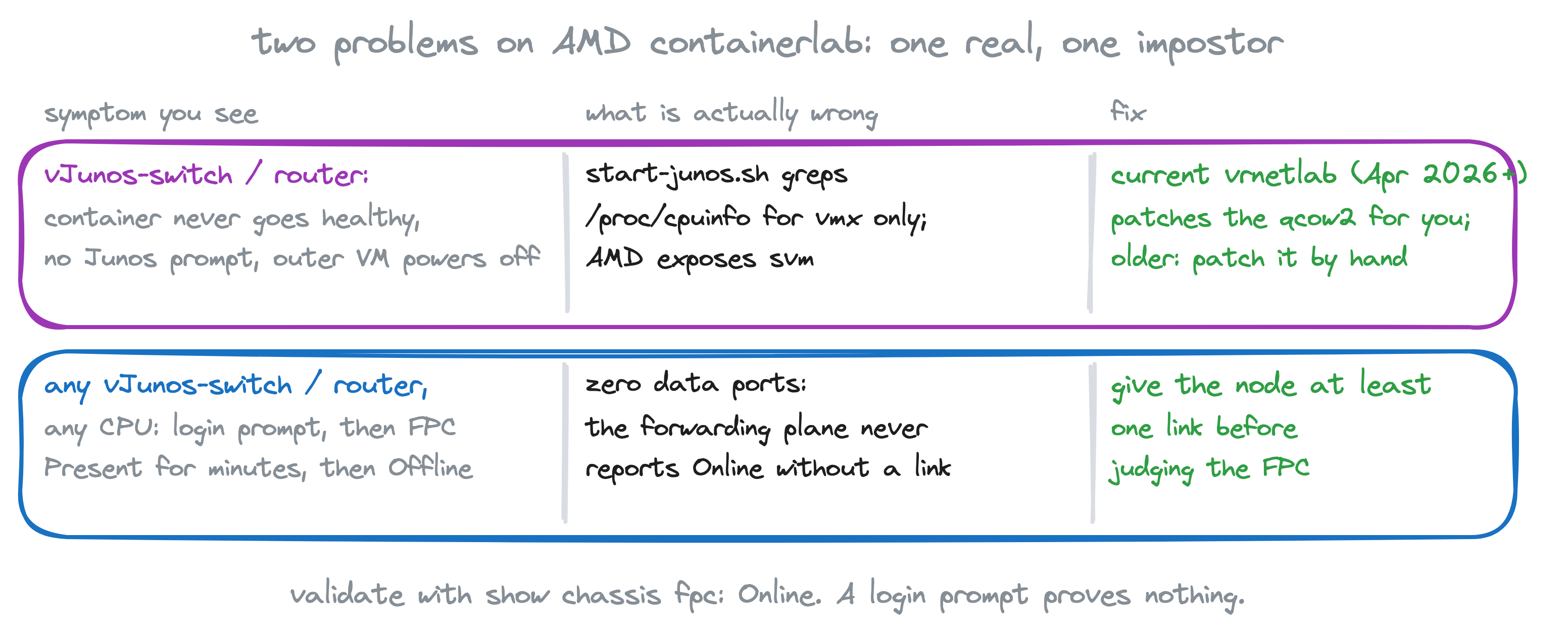
vJunos-switch and vJunos-router are a Linux VM that hosts the forwarding plane and boots the Junos control plane, the routing engine you log in to, as a nested VM. Before launching that inner VM, a script inside the image checks that nested virtualization is available, and it checks by grepping /proc/cpuinfo for the Intel flag. AMD exposes svm, not vmx, so the count is zero, the script prints a misleading complaint about nested KVM, and it powers the outer VM off. No Junos prompt, no healthy container. Here it is, verbatim, from the stock 26.2R1.7 switch image mounted read-only on the EPYC:
root@eve:~# lscpu | grep -E 'Vendor|Model name'
Vendor ID:   AuthenticAMD
Model name:  AMD EPYC 9575F 64-Core Processor
root@eve:~# grep -c vmx /proc/cpuinfo
0

root@eve:~# modprobe nbd max_part=8; mkdir -p /mnt/juniper
root@eve:~# qemu-nbd -r -c /dev/nbd0 vJunos-switch-26.2R1.7.qcow2
root@eve:~# mount -o ro /dev/nbd0p2 /mnt/juniper
root@eve:~# grep -n -A8 'CPU_FLAG=' /mnt/juniper/home/pfe/junos/start-junos.sh
72:CPU_FLAG=$(cat /proc/cpuinfo | grep -ci vmx)
73-
74-if [ "${CPU_FLAG}" -gt 0 ] ; then
75-    CACHE_MODE="writeback"
76-else
77-    echo "!!! Nested KVM (i.e. Nested VMX feature) is not enabled, shutting down!!!"  | tee -a "${QEMU_MONITOR_LOG}"
78-    /sbin/shutdown -h now
79-    exit 0
80-fi
The fix is one line (make the grep accept svm), and the good news for containerlab users is that since April 2026 you no longer have to apply it yourself. The vrnetlab Makefiles for juniper/vjunosswitch and juniper/vjunosrouter (PR #459, merged 2026-04-03) run a small helper container against your qcow2 before building the image, and it makes exactly this change. If your vrnetlab checkout or your built images predate that, you have the stock check and need the patch by hand:
root@eve:~/vrnetlab# grep -n -A3 'enable-amd-svm-on-images:' juniper/vjunosswitch/Makefile
24:enable-amd-svm-on-images:
25-	docker pull ghcr.io/birbnetworks/vjunos-amd-enable:latest
26-	for IMAGE in $(IMAGES); do \
27-		echo "Enabling AMD SVM flags on $$IMAGE"; \
After the build, the same line inside the image reads:
72:CPU_FLAG=$(cat /proc/cpuinfo | grep -ci "vmx\|svm")vJunosEvolved is a single Linux VM with no nested launcher, so it never had the problem. The launchers for all three start QEMU with -cpu host (the real EPYC, svm included; PR #418, November 2025, before which they emulated an IvyBridge model), and the Evolved launcher adds the OVMF firmware that 24.2 and later needs (PR #322). So on a current checkout the build is the stock one:
git clone https://github.com/srl-labs/vrnetlab.git && cd vrnetlab
cp ~/vJunos-switch-26.2R1.7.qcow2   juniper/vjunosswitch/  && (cd juniper/vjunosswitch  && make)
cp ~/vJunos-router-26.2R1.7.qcow2   juniper/vjunosrouter/  && (cd juniper/vjunosrouter  && make)
cp ~/vJunosEvolved-26.2R1.7.qcow2   juniper/vjunosevolved/ && (cd juniper/vjunosevolved && make)
docker images | grep junos
vrnetlab/juniper_vjunos-switch 26.2R1.7 ... 4.25GB
vrnetlab/juniper_vjunos-router 26.2R1.7 ... 3.64GB
vrnetlab/juniper_vjunosevolved 26.2R1.7 ... 2.56GBThe trap that looks like AMD and is not
This is the part that cost me the most time. A single vJunos-switch node, no links, to "just see if it boots":
name: nolink
topology:
  nodes:
    sw0:
      kind: juniper_vjunosswitch
      image: vrnetlab/juniper_vjunos-switch:26.2R1.7
It boots. It reaches the login prompt. Then the FPC sits at Present for several minutes and drops to unresponsive, over and over. On the EPYC:
# polled every ~35 s; first answer at 16:29, then:
admin@sw0> show chassis fpc | match "^ *0 "
  0  Present          Absent
# ... identical for four and a half minutes, then at 16:33:
admin@sw0> show chassis fpc | match "^ *0 "
  0  Offline          ---Restarting unresponsive board---
That reads like a CPU problem, and I chased it as one. It is not. The forwarding plane never reports Online with zero data ports, and it does the same on an Intel host: the same container did the same thing on a Xeon 8160, with 5 GB and with 8 GB, with -cpu host and with -cpu IvyBridge, so it cannot be the AMD check. Give the node one link and the identical image on the identical host reports the FPC Online within a minute of the login prompt. So the rule: never judge a vJunos-switch or vJunos-router node without at least one data link on it.
The three-node proof
One of each, wired in a triangle, nothing else:
name: vjunos262
topology:
  nodes:
    sw1:
      kind: juniper_vjunosswitch
      image: vrnetlab/juniper_vjunos-switch:26.2R1.7
    rtr1:
      kind: juniper_vjunosrouter
      image: vrnetlab/juniper_vjunos-router:26.2R1.7
    evo1:
      kind: juniper_vjunosevolved
      image: vrnetlab/juniper_vjunosevolved:26.2R1.7
  links:
    - endpoints: ["sw1:eth1", "rtr1:eth1"]
    - endpoints: ["sw1:eth2", "evo1:eth1"]
    - endpoints: ["rtr1:eth2", "evo1:eth2"]
root@eve:~/vjunos-amd# containerlab deploy -t vjunos262.clab.yml
root@eve:~/vjunos-amd# containerlab inspect -t vjunos262.clab.yml
clab-vjunos262-evo1 juniper_vjunosevolved running 172.20.20.2
clab-vjunos262-rtr1 juniper_vjunosrouter running 172.20.20.4
clab-vjunos262-sw1 juniper_vjunosswitch running 172.20.20.3The switch reported healthy about four minutes after deploy, the router at three, Evolved in under one. Then the real check, on each (default credentials admin / admin@123):
admin@sw1> show version | match "Model|Junos:"
Model: ex9214
Junos: 26.2R1.7
admin@sw1> show chassis fpc | except Empty
                     Temp  CPU Utilization (%)   CPU Utilization (%)  Memory    Utilization (%)
Slot State            (C)  Total  Interrupt      1min   5min   15min  DRAM (MB) Heap     Buffer
  0  Online           Testing   1         0        1      0      0    1023       24          0
admin@sw1> show interfaces terse | match "ge-0/0/[01] "
ge-0/0/0                up    up
ge-0/0/1                up    up
admin@rtr1> show version | match "Model|Junos:"
Model: vmx
Junos: 26.2R1.7
admin@rtr1> show chassis fpc | match "^ *0 "
0 Online Testing 2 0 1 0 0 1023 21 0
admin@rtr1> show interfaces terse | match "ge-0/0/[01] "
ge-0/0/0 up up
ge-0/0/1 up upadmin@evo1> show version | match "Model|Junos:"
Model: ptx10001-36mr
Junos: 26.2R1.7-EVOI20260619095247-evo-builder-1
admin@evo1> show chassis fpc | match "^ *0 "
0 Online
admin@evo1> show interfaces terse | match "et-0/0/[01] "
et-0/0/0 up up
et-0/0/1 up upThree FPCs Online, every link up on both ends, on a CPU with zero vmx flags. That is the whole AMD story for containerlab: build with current vrnetlab, give your nodes links, check the FPC.
A real lab, not a smoke test
To make sure this was not a one-node fluke I stood up a multivendor DCI lab on the same host: a Cisco N9Kv VXLAN fabric as DC1, a vJunos-switch fabric as DC2, a vJunosEvolved border gateway and a vJunos-switch DCI core stitching the two, plus four servers. Six vJunos-switch and one Evolved in total, next to six N9Kv. It is aninchat's Cisco-to-Juniper stitching lab from my fork, with the images bumped to 26.2R1.7 and the DC1 spine configs corrected so they actually peer with the gateways.
After a clean deploy, every Juniper node in it came up with its FPC Online and every fabric BGP session Established:
root@eve:~# for n in dc2-spine1 dc2-spine2 dc2-leaf1 dc2-leaf2 dc2-leaf3 dc2-gw core; do ...; done
dc2-spine1  ex9214           fpc=Online  bgp: 8 Establ
dc2-spine2  ex9214           fpc=Online  bgp: 8 Establ
dc2-leaf1   ex9214           fpc=Online  bgp: 4 Establ
dc2-leaf2   ex9214           fpc=Online  bgp: 4 Establ
dc2-leaf3   ex9214           fpc=Online  bgp: 4 Establ
dc2-gw      ptx10001-36mr    fpc=Online  bgp: 6 Establ
core        ex9214           fpc=Online  bgp: 1 Active 1 Connect 2 Establ
The core's two non-established peers are its sessions toward the Cisco DC1 gateway, which was down on that run (below).
And traffic actually forwards through the DC2 Juniper fabric. Server s3 (VLAN 10) hangs off dc2-leaf1; s4 (VLAN 20) is LACP-bonded to dc2-leaf2 and dc2-leaf3, so a ping between them is routed between VLANs across the EVPN-VXLAN fabric, leaf to spine to a different leaf, through the very forwarding plane the AMD check was shutting down:
root@eve:~# docker exec s4 ping -c5 -W2 172.16.10.3
5 packets transmitted, 5 received, 0% packet loss, time 4006ms
rtt min/avg/max/mdev = 1.732/2.119/3.153/0.524 ms
root@eve:~# docker exec s3 ping -c5 -W2 172.16.20.4
5 packets transmitted, 5 received, 0% packet loss, time 4004ms
rtt min/avg/max/mdev = 1.495/4.189/12.754/4.297 ms
The DC2 leaves and spines forwarding, the gateway and core with their fabric peers up, all on a CPU with no vmx flag. For honesty: on that run two of the six N9Kv (dc1-leaf2 and dc1-gw) stayed unhealthy, so the Cisco half of the DCI was down and the cross-DC pings with it. Not a Juniper or CPU problem: vrnetlab's console config push into those two stalled mid-file (the last sending channel input line in docker logs shows where), and on my other deploy of the same lab a different N9Kv dropped to its bootloader instead. Both are traits of the Cisco image on this host; recycle the node and move on.
Two more things that will save you time
- Do not
docker restarta containerlab node. A restarted container loses the veths containerlab wired to it, so the node comes back with no data links, and you already know what vJunos does with no data links. If a node is stuck,docker rm -fit and runcontainerlab deployon the lab again: deploy recreates the missing node and re-wires its links, at the cost of also recreating its link peers (VM kinds cannot hot-plug). - N9Kv has two first-boot failure modes on this host, both showing up as a node stuck unhealthy while its siblings are fine: it drops to its loader (
No autoboot or failed autoboot. falling to loaderon the console) and never loads NX-OS, or NX-OS boots but vrnetlab's console config push stalls mid-file (check the lastsending channel inputline indocker logs). Recycle the node either way.
Checklist
- Build the three images with current vrnetlab (April 2026 or later). The AMD patch for switch and router is applied by the Makefile; on an older checkout patch the qcow2 by hand first.
- Every vJunos-switch and vJunos-router node gets at least one link before you look at it.
- Validate with
show chassis fpc. Online is the answer; a login prompt is not.
Sources
- containerlab: juniper_vjunosswitch kind, juniper_vjunosevolved kind
- srl-labs/vrnetlab (the juniper/ Makefiles and launchers)
- Juniper vJunos-switch on KVM deployment guide
- aninchat/learning-labs: Cisco multisite to Juniper VXLAN stitching (the interop lab; I ran my fork with 26.2R1.7 images and corrected DC1 spine configs)