On this page
The fabric from Part 4 is a working private cloud with one problem: it is hermetically sealed. No packet gets in, none gets out. This part builds the edge: the border leaves hand the tenant's routes to a pair of Active/Active Palo Alto firewalls over eBGP, the firewalls hand back a default route, and exactly two doors get drilled through for inbound traffic.
Fair warning on scope: the firewalls themselves, route-based Active/Active with HA1/HA2/HA3, floating versus routed design, NAT state sync, and what actually happens during failover, have their own trilogy on this blog, and this post does not re-teach them. This is the wiring: how a firewall pair becomes just another BGP speaker hanging off the fabric.
The edge topology
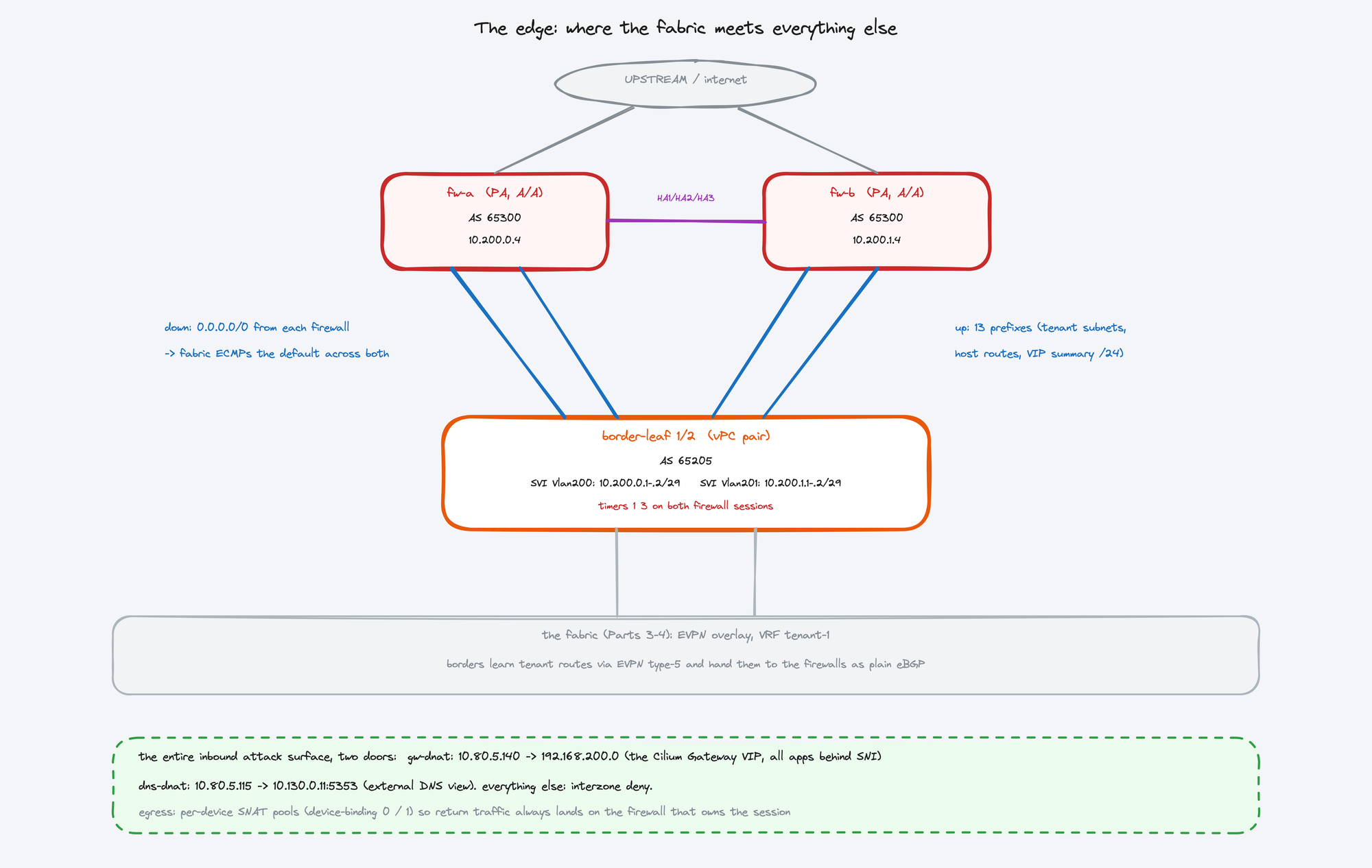
Each firewall gets its own /29 and its own SVI on the border pair: fw-a peers with both border leaves on Vlan200 (10.200.0.0/29), fw-b on Vlan201 (10.200.1.0/29). Four eBGP sessions total, firewall AS 65300 against the border AS 65205. The links ride the vPC pair, so either border leaf can die and both firewalls keep a session up.
Why SVIs over the vPC instead of routed point-to-point ports? Because the firewalls attach with LACP bonds to survive a border leaf failure, and a bond into a vPC pair terminates on a VLAN, not a routed port. That choice works, but it smuggles in the sharpest failure mode of this entire edge, which is what the timers below are about.