
On this page
This is part 7 of a series on learning F5 BIG-IP Local Traffic Manager on a real data-centre fabric running on SONiC switches. Each part goes with a video on the LevelUP I.T. YouTube channel. Part 6 covered health monitors. This part covers persistence: how the BIG-IP sends a returning client back to the same pool member, and what that costs.
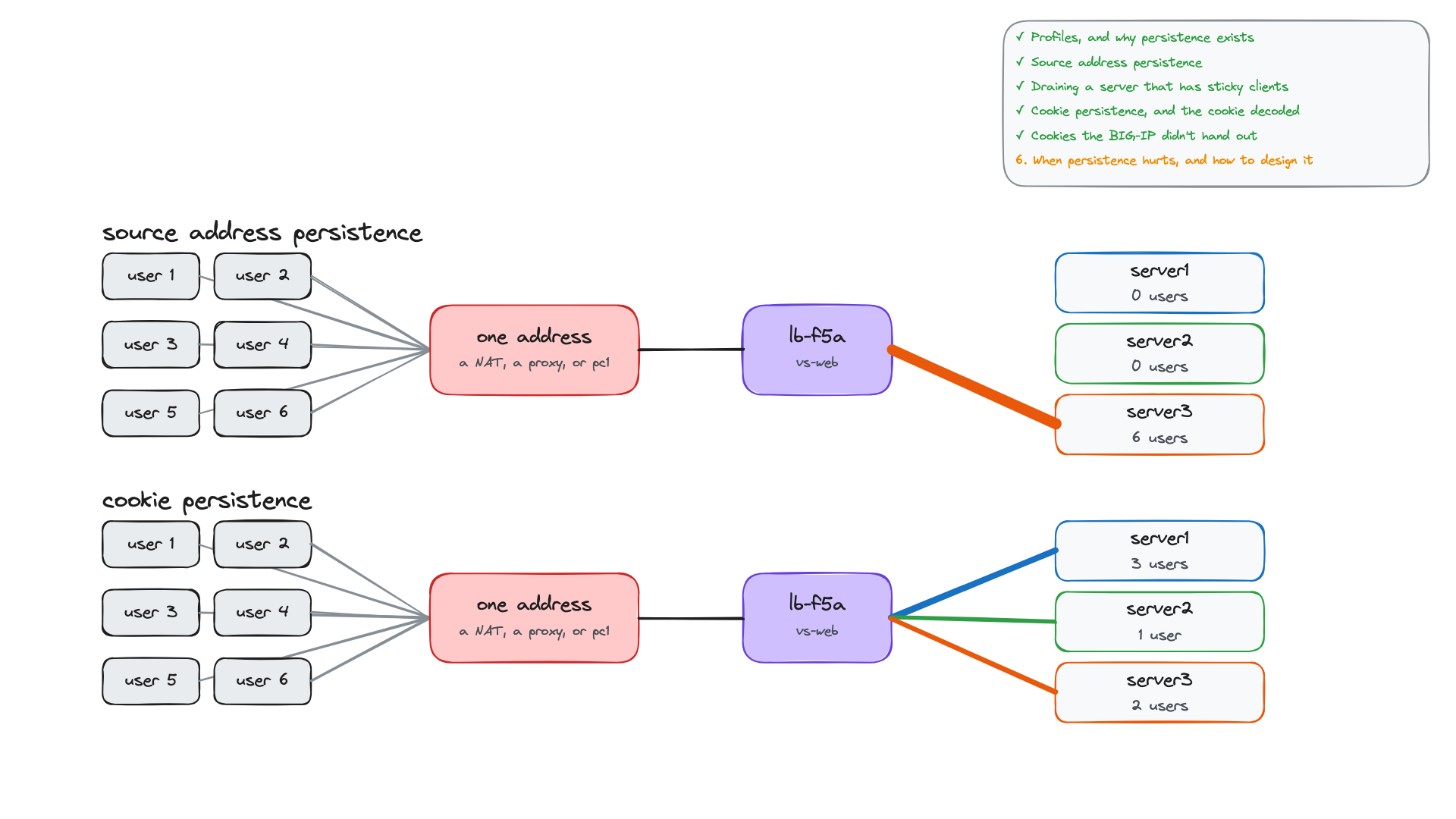
Six users behind one IP address sent requests to the same application. With source address persistence, all six landed on server3. With cookie persistence, they spread across all three servers, and each one still stayed on its own server. This part builds both on lb-f5a, reads the persistence records and the cookie, decodes the cookie, and shows when persistence works against load balancing.
What you'll see
- What a profile is, and why persistence exists.
- Source address persistence built in the web UI: its records, idle timeout and mask, tested live.
- Draining a member that has persistent clients: disabled vs forced offline.
- Cookie insert persistence, and the
BIGipServercookie decoded. - Forged, stale and encrypted cookies, and why cookies need an HTTP profile.
- Shared addresses, the fallback trap, and a production design checklist.
Profiles, and why persistence exists
The load-balancing method from part 5 decides per connection, so consecutive connections from one user can reach different members. Applications that keep state on the server (a login session, a basket, a half-finished form) need the user to come back to the same member. Persistence does that: if an entry matches the client and its member can take the connection, the method is skipped. If there is no entry, or the member is down or forced offline, the method picks a member and a new entry is written.
Persistence is configured with a profile: a named set of settings attached to a virtual server. Every custom profile has a parent (defaults-from); http-xff from part 4 is the built-in http with one setting changed. The built-in persistence parents are source_addr, cookie, dest_addr, hash, host, msrdp, sip_info, ssl and universal.
Without persistence, 12 requests from each PC reached all three servers. A short run on one server is not persistence: each TMM keeps its own round-robin turn.