On this page
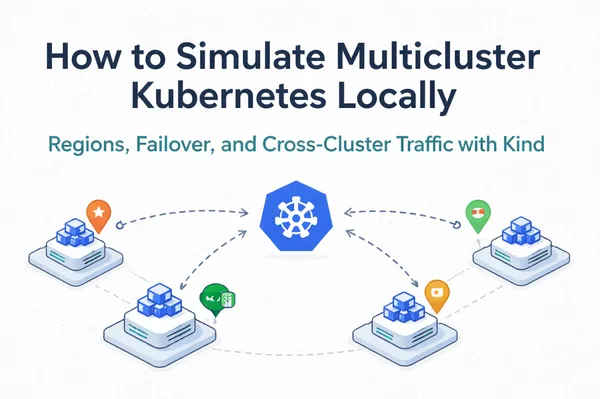
Running an application across multiple Kubernetes clusters gives you independent failure domains, regional traffic routing, and the ability to take a region offline without your users noticing. This tutorial walks through building a complete multicluster Kubernetes setup locally using Kind (Kubernetes in Docker): three clusters representing three geographic regions, a shared local image registry, LoadBalancer services provisioned by cloud-provider-kind, cross-cluster HTTP and TCP tests using a nettools DaemonSet, and a full failover demonstration.
What You Will Build
By the end of this tutorial you will have:
- Three isolated Kind clusters simulating
us-east,eu-west, andap-southeastregions - A local Docker registry serving images to all clusters with no Docker Hub dependency
- A regional nginx application with LoadBalancer services in each cluster
- Cross-cluster HTTP and TCP tests using kubectl exec
- A live failover simulation showing traffic rerouting when a region goes down
- A coordinated rolling update applied across all three clusters in sequence
Prerequisites
You need the following tools installed before starting:
- Docker Desktop, docker.com/products/docker-desktop
- kind,
brew install kind - kubectl,
brew install kubectl - cloud-provider-kind,
go install sigs.k8s.io/cloud-provider-kind@latest
Verify everything is in place:
kind version
kubectl version --client
cloud-provider-kind --version
Architecture Overview
The multicluster setup maps three Kind clusters to three simulated geographic regions:
| Cluster | Region | Role |
|---|---|---|
| kind-region-a | us-east | US East Coast |
| kind-region-b | eu-west | EU West |
| kind-region-c | ap-southeast | Asia Pacific |
Each cluster has one control-plane node and two worker nodes. A local registry:2 container serves all images, bypassing Docker Hub entirely. A single cloud-provider-kind process watches all three clusters and provisions Envoy proxies for any type: LoadBalancer service across all of them. The application is a simple nginx deployment where each pod writes its region name and pod hostname to disk at startup. Curling the LoadBalancer IP tells you exactly which region answered and which pod handled the request, which makes every routing, distribution, and failover test immediately readable in the output.
Step 1: Set Up the Local Image Registry
Kind nodes run linux/amd64 inside the Docker Desktop VM. The local registry sidesteps Docker Hub rate limits and ensures the correct image platform is served to every node. Start it before creating any clusters:
docker run -d --restart=always -p 5001:5000 --name kind-registry registry:2
Pull each required image with the explicit linux/amd64 platform flag, tag it for the local registry, and push it:
for img in busybox:1.36 nginx:1.25 nginx:1.27; do
  docker pull --platform linux/amd64 $img
  docker tag $img localhost:5001/$img
  docker push localhost:5001/$img
done
Every Kubernetes manifest in this tutorial references images as localhost:5001/nginx:1.25. Kind nodes resolve localhost:5001 to the kind-registry container over the internal Docker network.
Step 2: Create the Three Regional Kind Clusters
Save the following as kind-region-a.yaml. Create equivalent files for kind-region-b.yaml and kind-region-c.yaml, changing the name field in each:
kind: Cluster
apiVersion: kind.x-k8s.io/v1alpha4
name: kind-region-a
nodes:
  - role: control-plane
  - role: worker
  - role: worker
Create all three clusters:
kind create cluster --name kind-region-a --config kind-region-a.yaml
kind create cluster --name kind-region-b --config kind-region-b.yaml
kind create cluster --name kind-region-c --config kind-region-c.yaml
Verify all three contexts are available:
kubectl config get-contexts | grep kind-region
kind-kind-region-a   kind-kind-region-a   kind-kind-region-a
kind-kind-region-b   kind-kind-region-b   kind-kind-region-b
kind-kind-region-c   kind-kind-region-c   kind-kind-region-c
Step 3: Connect the Registry to All Clusters
Connect the registry container to the kind Docker network once. It is shared across all Kind clusters:
docker network connect kind kind-registry
Patch containerd on every node in all three clusters so they resolve localhost:5001 to the registry container:
for cluster in kind-region-a kind-region-b kind-region-c; do
  for node in $(kind get nodes --name $cluster); do
    docker exec "$node" sh -c \
      'mkdir -p /etc/containerd/certs.d/localhost:5001 && \
       printf "[host.\"http://kind-registry:5000\"]\n  capabilities = [\"pull\", \"resolve\"]\n" \
       > /etc/containerd/certs.d/localhost:5001/hosts.toml'
  done
done
This writes a hosts.toml file directly into each node's containerd configuration directory via docker exec. No kubectl or DaemonSet required.
Step 4: Start cloud-provider-kind
cloud-provider-kind assigns external IPs to type: LoadBalancer services in Kind clusters. Start it once. It handles all three clusters simultaneously:
sudo cloud-provider-kind > /tmp/cloud-provider-kind.log 2>&1 &
Step 5: Deploy Consistent ConfigMap to All Clusters
One of the most critical properties of a stable multicluster setup is configuration consistency. Clusters that drift from each other compound into operational problems: debugging becomes harder, runbooks diverge, and knowledge gained in one cluster does not transfer to another.
Save the following as app-config.yaml:
apiVersion: v1
kind: ConfigMap
metadata:
  name: app-config
data:
  app-version: "v1.0.0"
  log-level: "info"
  max-connections: "100"
  feature-flag-new-ui: "false"
Apply it to all three clusters in a single loop:
for ctx in kind-kind-region-a kind-kind-region-b kind-kind-region-c; do
  kubectl --context=$ctx apply -f app-config.yaml
done
Read back app-version from each cluster to confirm they match:
for ctx in kind-kind-region-a kind-kind-region-b kind-kind-region-c; do
  echo -n "$ctx: "
  kubectl --context=$ctx get configmap app-config -o jsonpath='{.data.app-version}'
  echo ""
done
kind-kind-region-a: v1.0.0
kind-kind-region-b: v1.0.0
kind-kind-region-c: v1.0.0
In production this loop is replaced by a GitOps controller. The source of truth is a repository. Every cluster is a consumer of that repository. Configuration drift is a bug, not an acceptable trade-off.