On this page
I wanted to watch a request go all the way through, rather than take the diagram's word for it. So I picked one HTTPS request from a client sitting outside the fabric and followed it: through the firewall, over the fabric, into the cluster, and finally into a pod. At every device it touched I grabbed the output. The same TCP sequence number turns up on a leaf and on a server. The same router MAC turns up first inside a BGP route and later in a packet on a spine link.
The environment is a VXLAN BGP EVPN fabric running NVIDIA Cumulus Linux, with a Palo Alto Active/Active pair at the edge and a Kubernetes cluster running Cilium behind it. Every host is dual homed with MLAG, and every tenant lives in its own VRF. That last decision shapes almost everything else here.
Every address and every line of output here is exactly as it was captured, including the ones outside the fabric. Nothing is masked and nothing is retyped. Full device configurations are at the end.
The topology
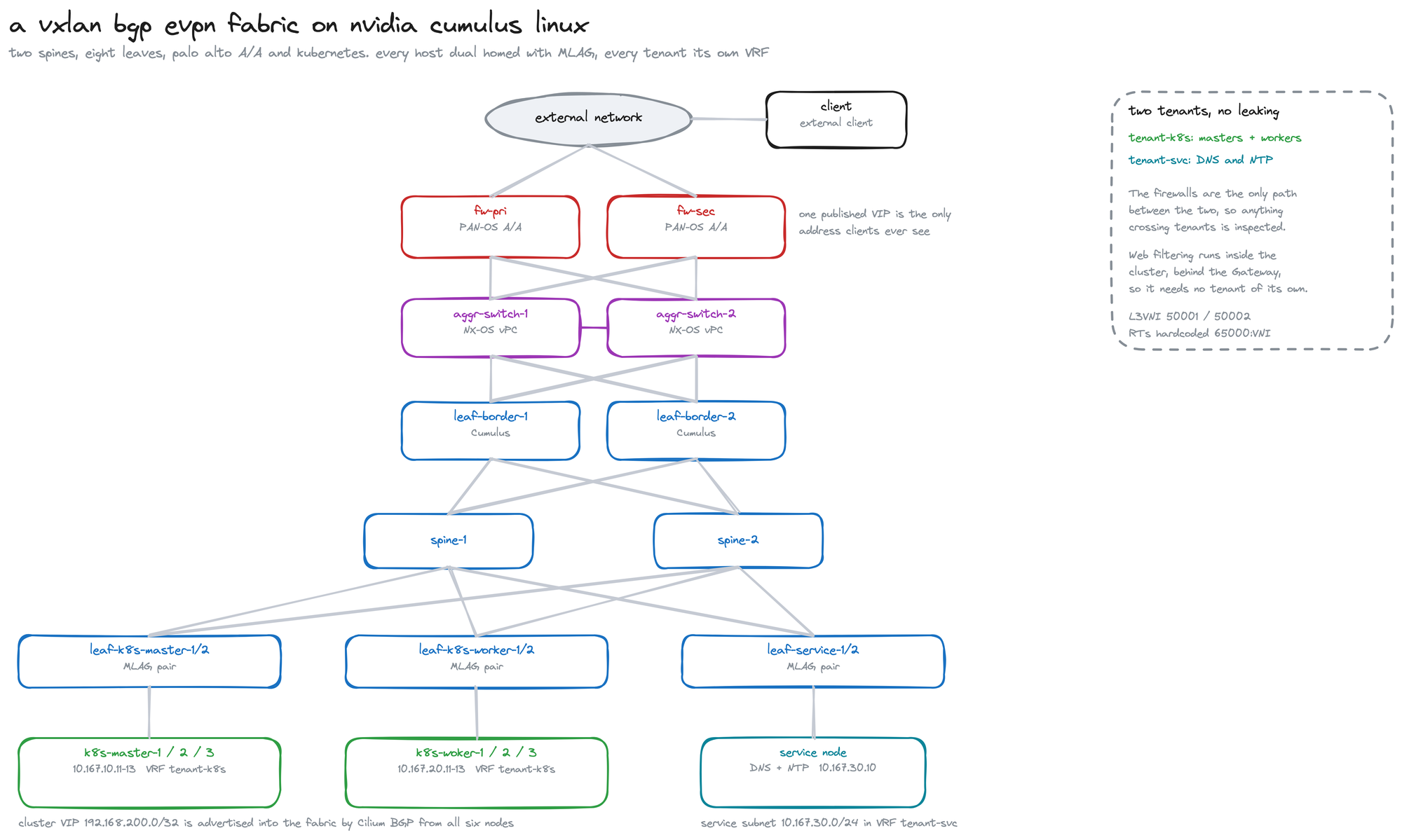
Two spines and eight leaves running NVIDIA Cumulus Linux in four MLAG pairs, an NX-OS vPC pair in front of the firewalls, and seven Linux hosts behind them. Two tenants share the fabric and never see each other inside it: tenant-k8s for the cluster on L3VNI 50001, and tenant-svc for DNS and NTP on 50002. Web filtering used to be a third tenant with its own machines; it now runs inside the cluster, which is a story for further down.
The underlay, and what the spine never learns
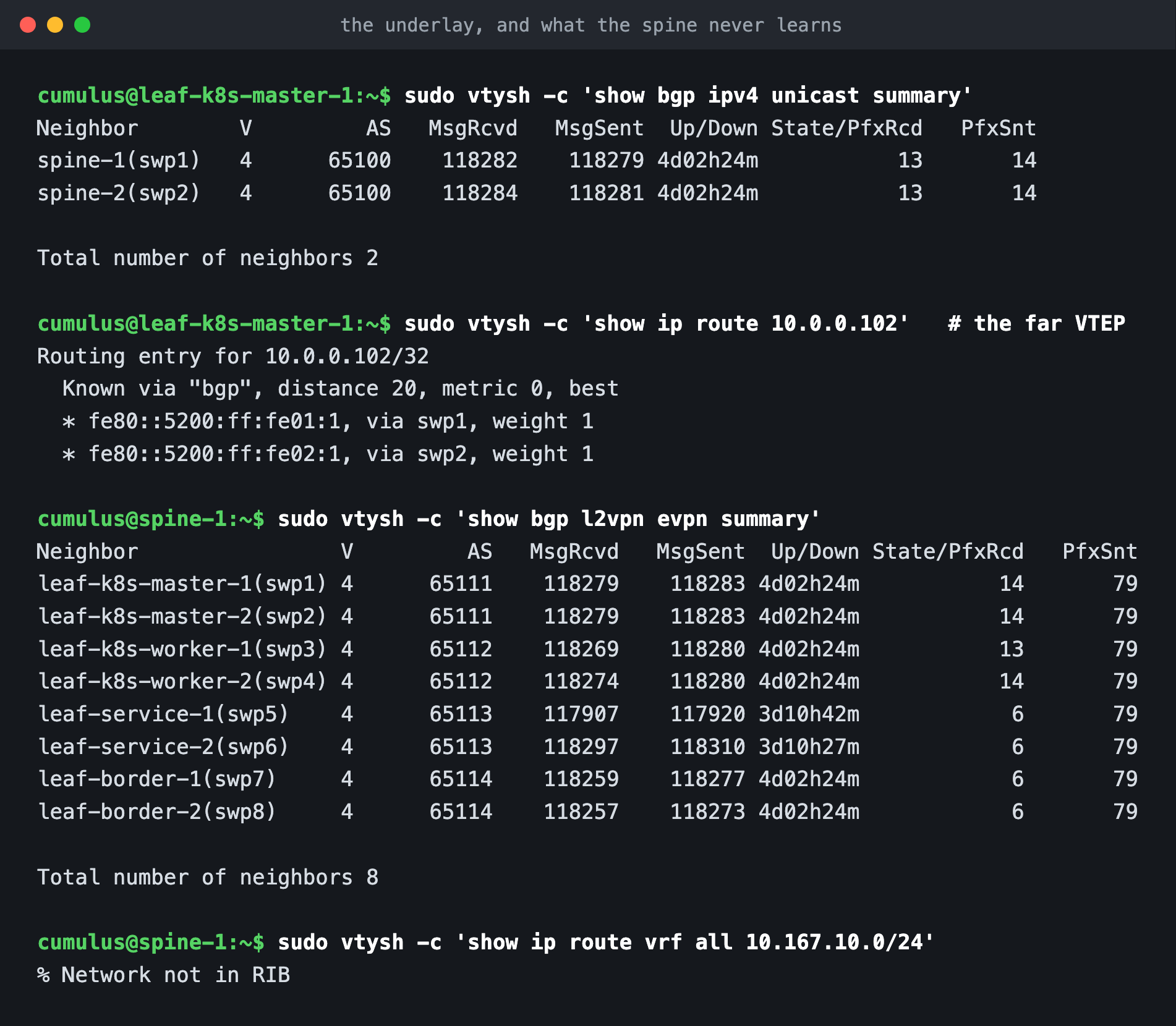
The underlay is boring on purpose. Every leaf runs BGP unnumbered to both spines, so there is no addressing on the fabric links at all. Sessions come up over IPv6 link-local addresses, which is why the next hops read as fe80::. The only thing that session really needs to carry is loopbacks, and the loopback that matters is the VTEP address.
Look at the second command. The route to the far VTEP at 10.0.0.102 has two next hops, one through each spine, so the path is already redundant before a single tenant packet exists.
Then the spine's own view: eight EVPN sessions, one per leaf. The command I would frame, though, is the last one. Ask the spine about a tenant subnet and it says % Network not in RIB. It has genuinely never heard of 10.167.10.0/24. The spine shuttles EVPN routes around as BGP payload and forwards VXLAN as ordinary IP between loopbacks. Every piece of tenant state lives out on the leaves, which is exactly what you want.
Inside the bridge domain
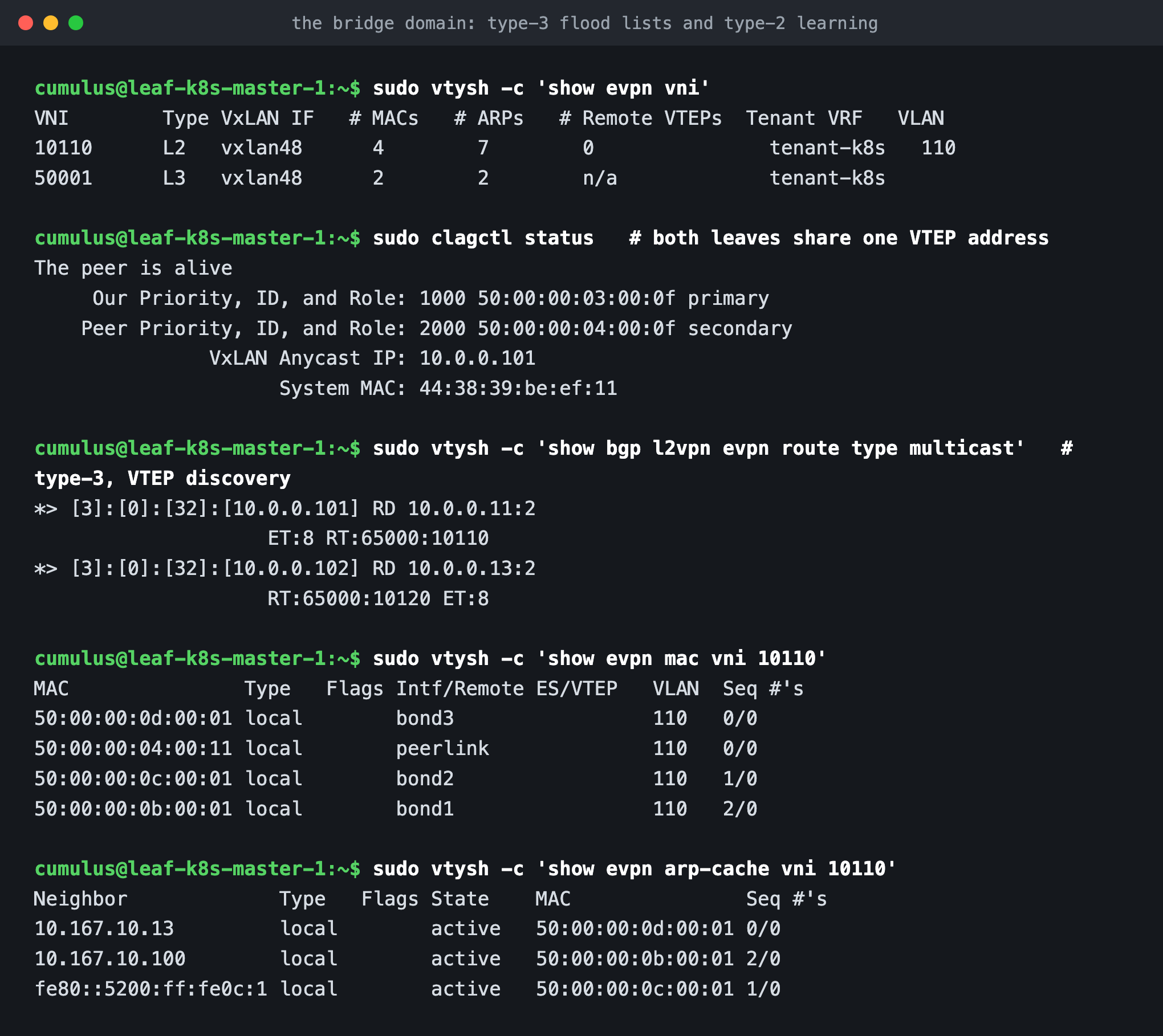
If the leaves hold all the state, the next question is what that state looks like. show evpn vni is the quickest way to read one. VNI 10110 is an L2VNI: bridged, tied to VLAN 110, sitting in tenant-k8s. VNI 50001 is an L3VNI and has no VLAN of its own. Those two lines are the symmetric IRB model in miniature, and the second one comes back shortly.
Then MLAG. Both leaves in a pair advertise the same VTEP address, 10.0.0.101, listed there as the VxLAN Anycast IP. Remote leaves never find out that a host is dual homed. They see one VTEP, and whichever physical leaf receives the frame forwards it. That is why losing a leaf is uneventful, and also why the peer link deserves more respect than it usually gets.
The type-3 routes are next. A type-3, or Inclusive Multicast Ethernet Tag, is a VTEP saying "I am part of this L2VNI". You can read the pair straight off the screen: [3]:[0]:[32]:[10.0.0.101] with RT:65000:10110, and 10.0.0.102 with RT:65000:10120. Those build the flood list for broadcast, unknown unicast and multicast, so ARP has somewhere to go before anything has been learned.
After that it is ordinary learning. The EVPN MAC table shows each host MAC against the bond it arrived on, and the ARP cache ties those MACs to addresses. Put the two together and you have a type-2 route, which is where it gets interesting.
Symmetric routing, from a route to a router MAC to the wire
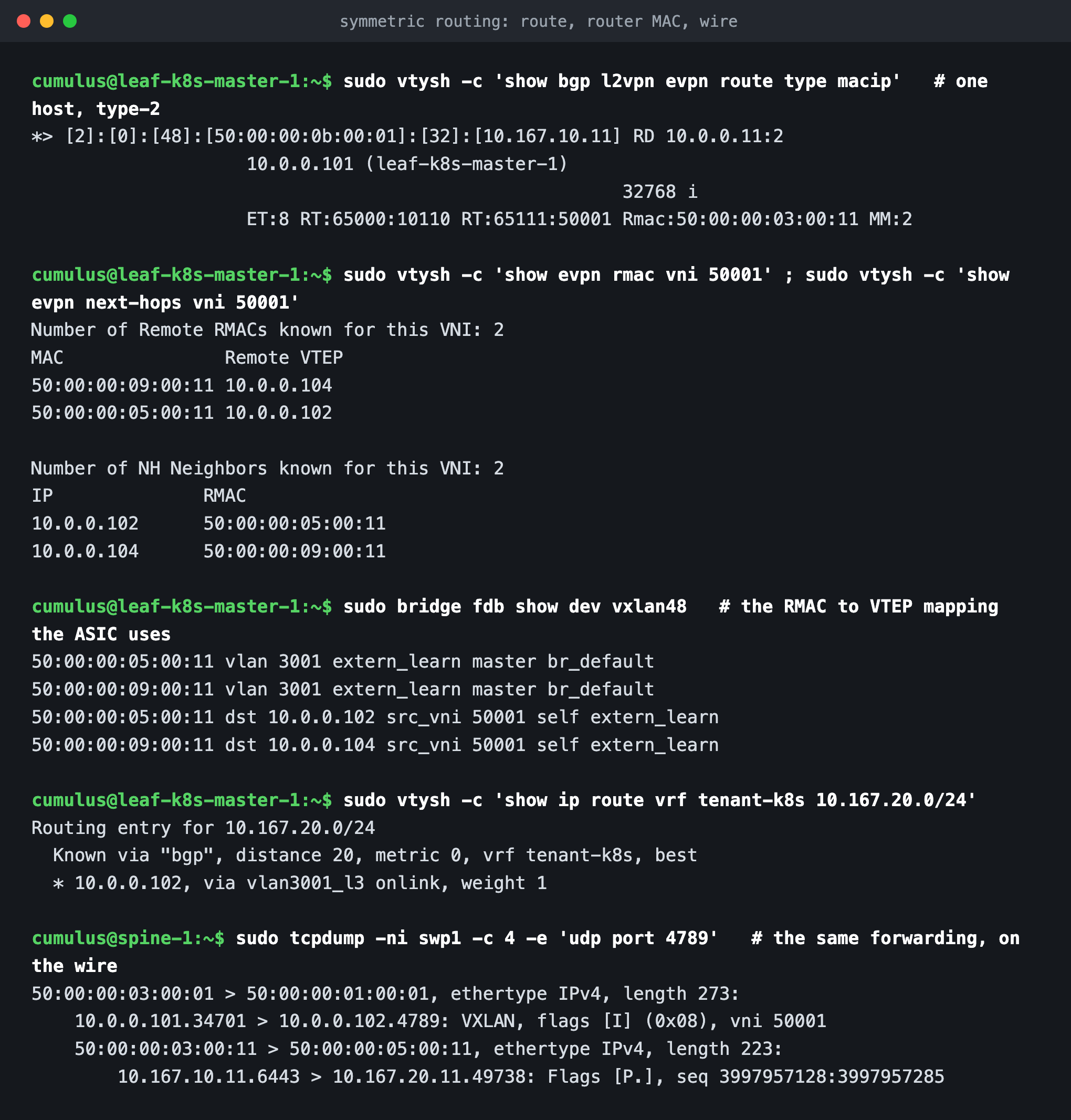
This part rewards slowing down. Here is a single type-2 route:
[2]:[0]:[48]:[50:00:00:0b:00:01]:[32]:[10.167.10.11] RD 10.0.0.11:2
    ET:8 RT:65000:10110 RT:65111:50001 Rmac:50:00:00:03:00:11
One advertisement doing three jobs. It carries a MAC and an IP, so it fills in both the remote MAC table and the remote ARP cache. It carries two route targets, one for the L2VNI and one for the L3VNI, so leaves import it into the right bridge domain and the right VRF. And it carries Rmac, the router MAC of the leaf that sent it.
That router MAC is the hinge the whole thing turns on. With asymmetric routing the ingress leaf has to know every destination VLAN. With symmetric routing it does not: it routes into one transit VNI and lets the egress leaf route out the other side. For that it needs the egress leaf's router MAC, and the route just handed it over.
You can watch it spread. show evpn rmac and show evpn next-hops tie each remote VTEP to a router MAC. bridge fdb show dev vxlan48 is the entry the kernel forwards on: 50:00:00:05:00:11 dst 10.0.0.102 src_vni 50001, which reads as "to reach that router MAC, encapsulate to that VTEP using VNI 50001". The route itself resolves out of vlan3001_l3, the internal SVI belonging to the L3VNI.
Here is the payoff, taken off a spine port:
50:00:00:03:00:01 > 50:00:00:01:00:01 ... 10.0.0.101.34701 > 10.0.0.102.4789: VXLAN, vni 50001
    50:00:00:03:00:11 > 50:00:00:05:00:11 ... 10.167.10.11.6443 > 10.167.20.11.49738
The outer header is VTEP to VTEP in VNI 50001, the L3VNI. The inner header starts with the ingress leaf's router MAC and is addressed to 50:00:00:05:00:11, the very same router MAC from the BGP route and the FDB. Underneath sit the two hosts. Notice what is missing: VLAN 110 and VLAN 120 appear nowhere on the wire, because the packet never rides the source VLAN across the fabric. It rides the transit VNI.
One loose end before moving on, because a careful reader will spot it. Those two route targets on the type-2 do not match each other in style. RT:65000:10110 is the L2VNI target I set by hand. RT:65111:50001 is set nowhere: FRR derives an L3VNI target from the originating pair's own ASN, 65111, and attaches it on export. The target I pinned for that VNI is 65000:50001, and that is what both pairs import and export, which the configuration section further down shows. So the wire carries a derived value while the VNI reports the pinned one, and traffic keeps resolving either way. I would rather flag it here than have you find it mid-migration.
When the address is not a host at all
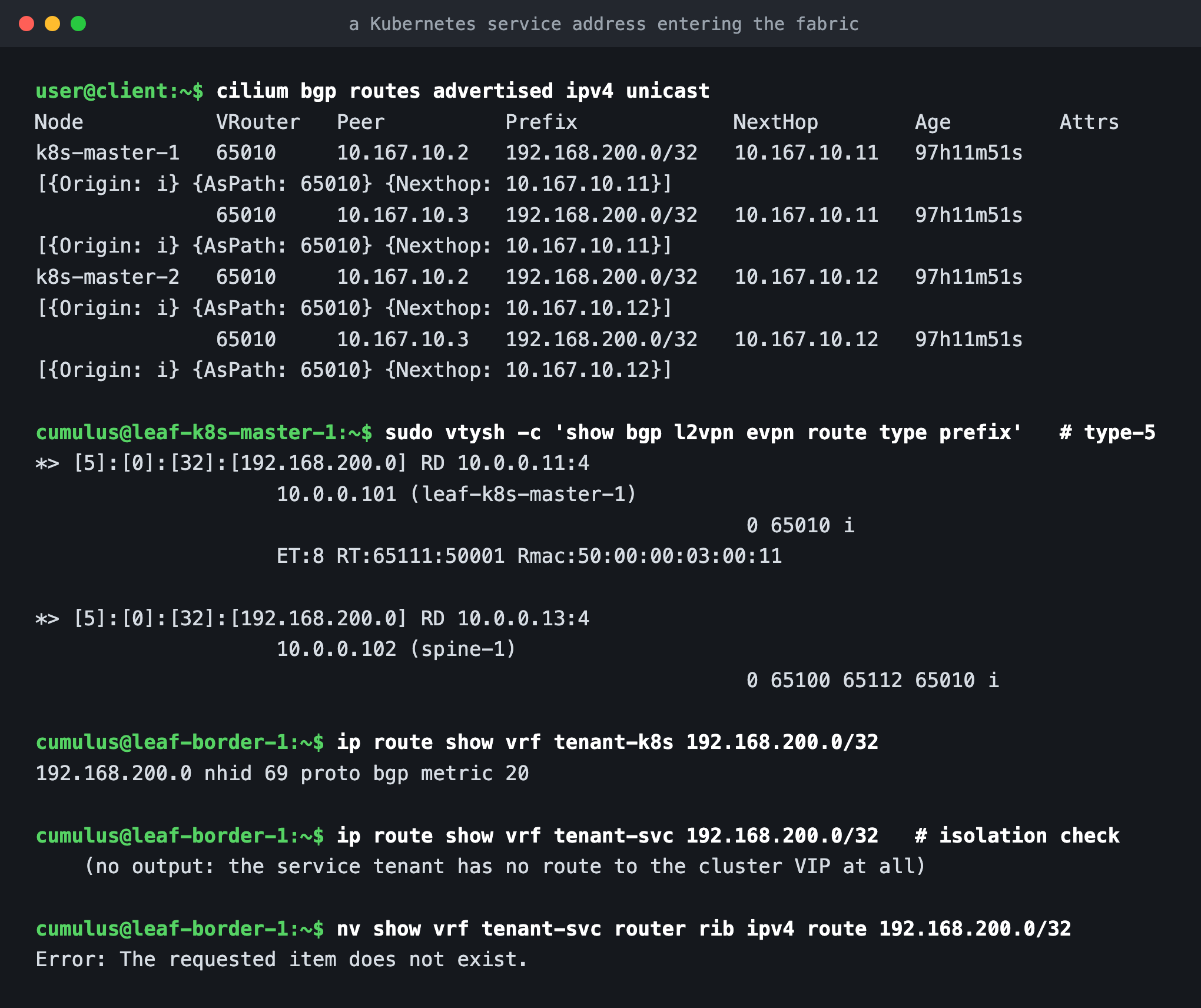
Type-2 covers hosts the fabric can see. A Kubernetes LoadBalancer address is not a host in that sense, because it lives on every node at once, so it has to get in another way.
Cilium runs BGP on each node and advertises 192.168.200.0/32 to its leaf pair with the node's own address as next hop. The leaf takes that ordinary IPv4 route and re-exports it into EVPN as a type-5 prefix route, tagged with the L3VNI route target and, once again, the leaf's router MAC. Every leaf in tenant-k8s imports it. All six nodes advertise that same prefix, three to each of the two host leaf pairs, so every one of those four leaves ends up originating it under its own route distinguisher. The fabric therefore reaches the service address by several paths at once. The excerpt on screen shows two of the four.
The last command there is the one I keep coming back to. Ask the border leaf for the cluster VIP inside the service tenant's VRF and there is simply nothing, and NVUE is blunt about it: Error: The requested item does not exist. The service tenant cannot reach the cluster, not because a rule forbids it, but because the route was never there. Isolation you can prove with an empty routing table beats isolation you have to take on trust.
What the request actually does
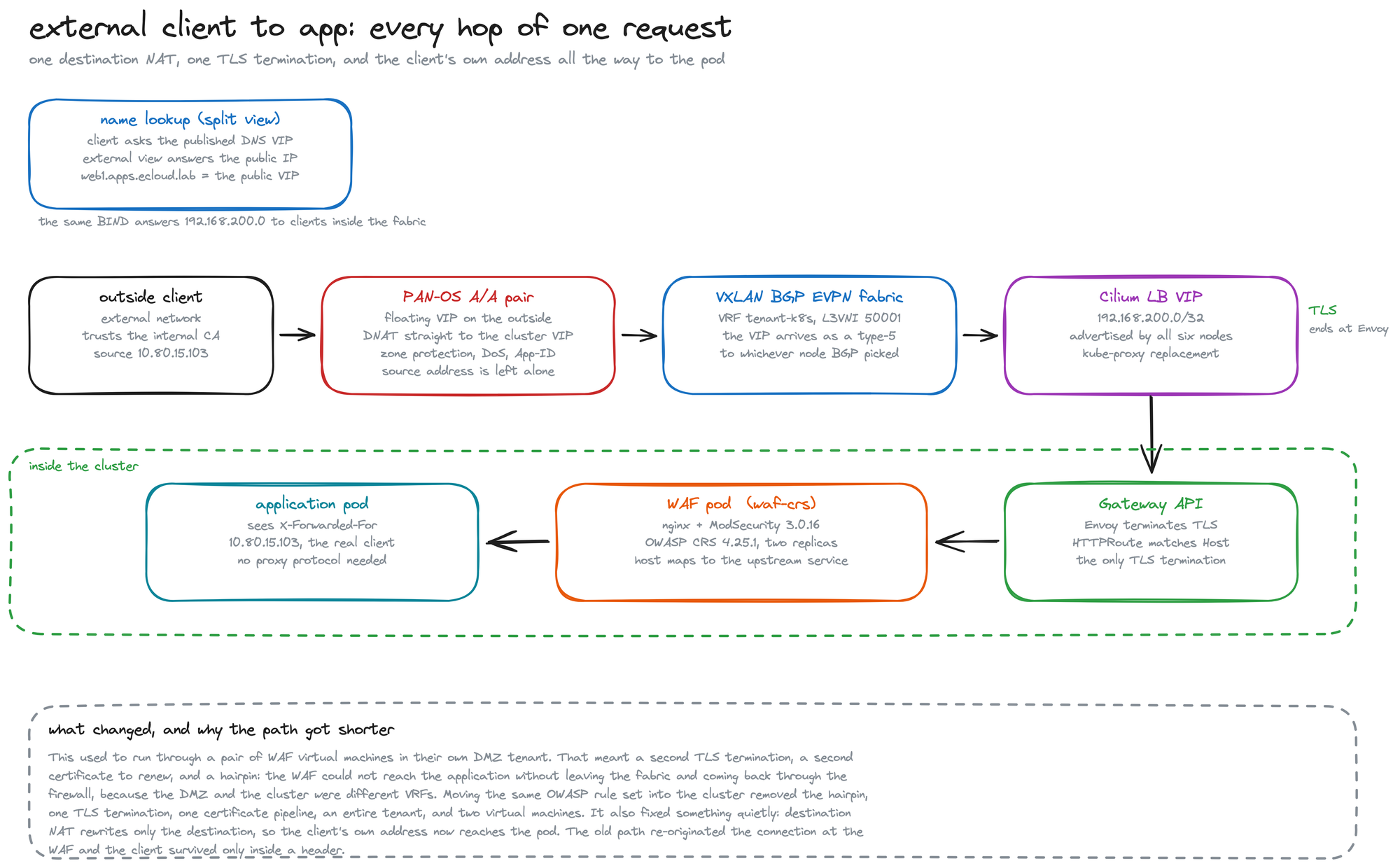
With the fabric making sense, the end-to-end path is quick to follow. DNS answers differently depending on who is asking, because BIND runs split views and the query arrives carrying the client's outside address. The firewall owns one published address and destination NATs it to the cluster VIP. Destination NAT rewrites only the destination, so the packet keeps the client's own source address the whole way in. Cilium's Gateway terminates TLS, the HTTPRoute matches on Host, and the request goes to a WAF pod that runs the OWASP Core Rule Set before handing it to the application. Load balancing across pods is already Cilium's job, so there is deliberately nothing else in the path doing it.
This part used to be longer. Web filtering ran on a pair of virtual machines in a DMZ tenant of their own, which cost a second TLS termination and a second certificate to keep renewed. It also cost a hairpin. The DMZ and the cluster were different VRFs, so the filter could not reach the application without leaving the fabric and coming back in through the firewall. Moving the same rule set inside the cluster removed all of it: the hairpin, one TLS termination, one certificate pipeline, an entire tenant and two machines. It fixed something else too, quietly, and the captures show that better than another paragraph would.
The same request, from two capture points
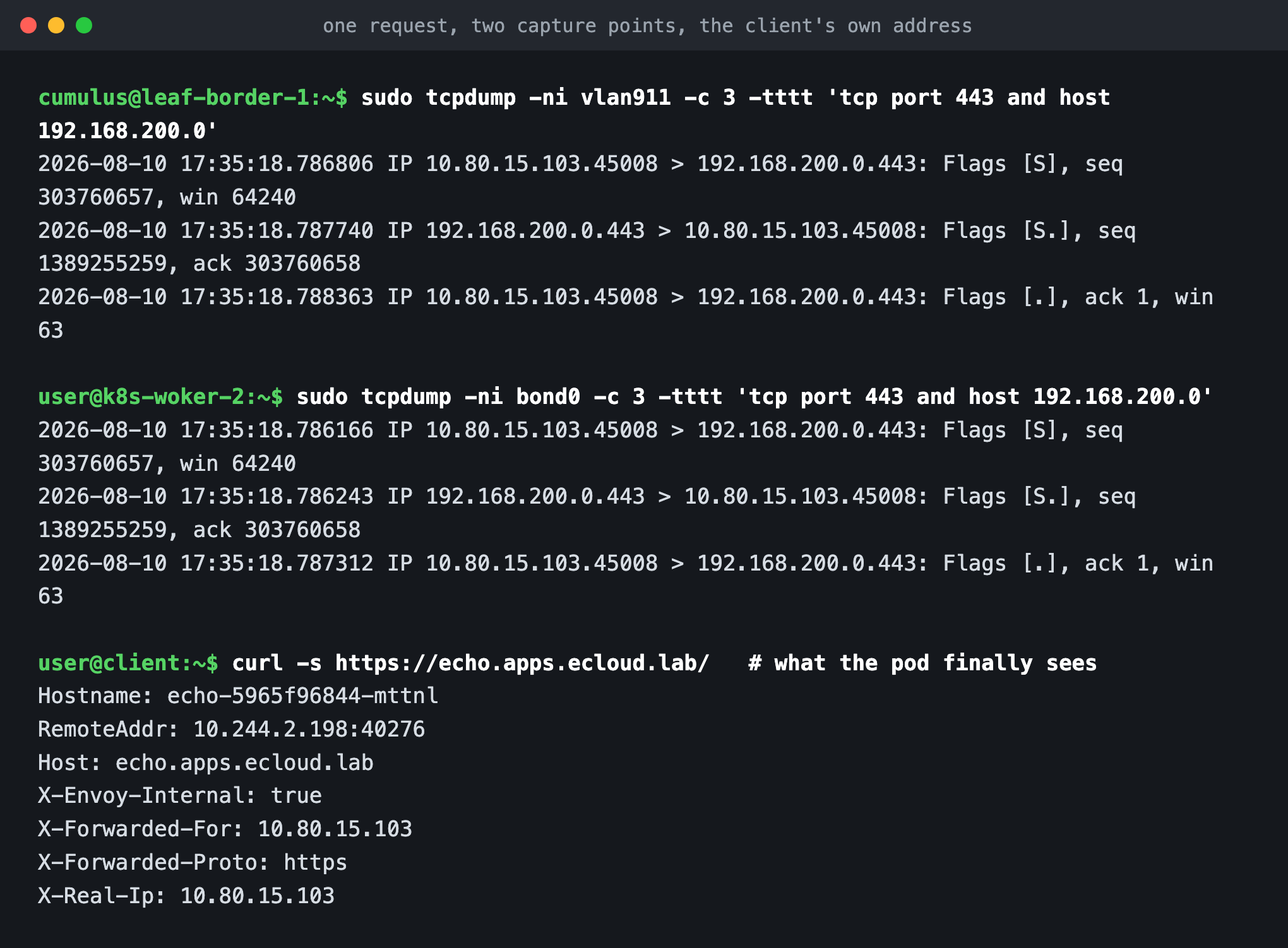
Two captures, one handshake. On the border leaf's transit SVI towards the firewall, and on the bond of the worker that BGP happened to land the flow on, the same seq 303760657 appears, and so does the same source: 10.80.15.103, the client itself. In between, the packet was encapsulated into the L3VNI, crossed a spine, and came out the other side, and none of that touched the addresses.
Below those two captures sits the same request as the application pod receives it, and that is the point of the exercise. X-Forwarded-For and X-Real-Ip both read 10.80.15.103. Nothing re-originated the connection on the way in, so there is no proxy protocol to configure and no trust chain to get wrong. The old path could not do this: the filter opened its own connection to the cluster, so what arrived was the filter's address and the client survived only as a header someone had remembered to set.
The edge, in four commands
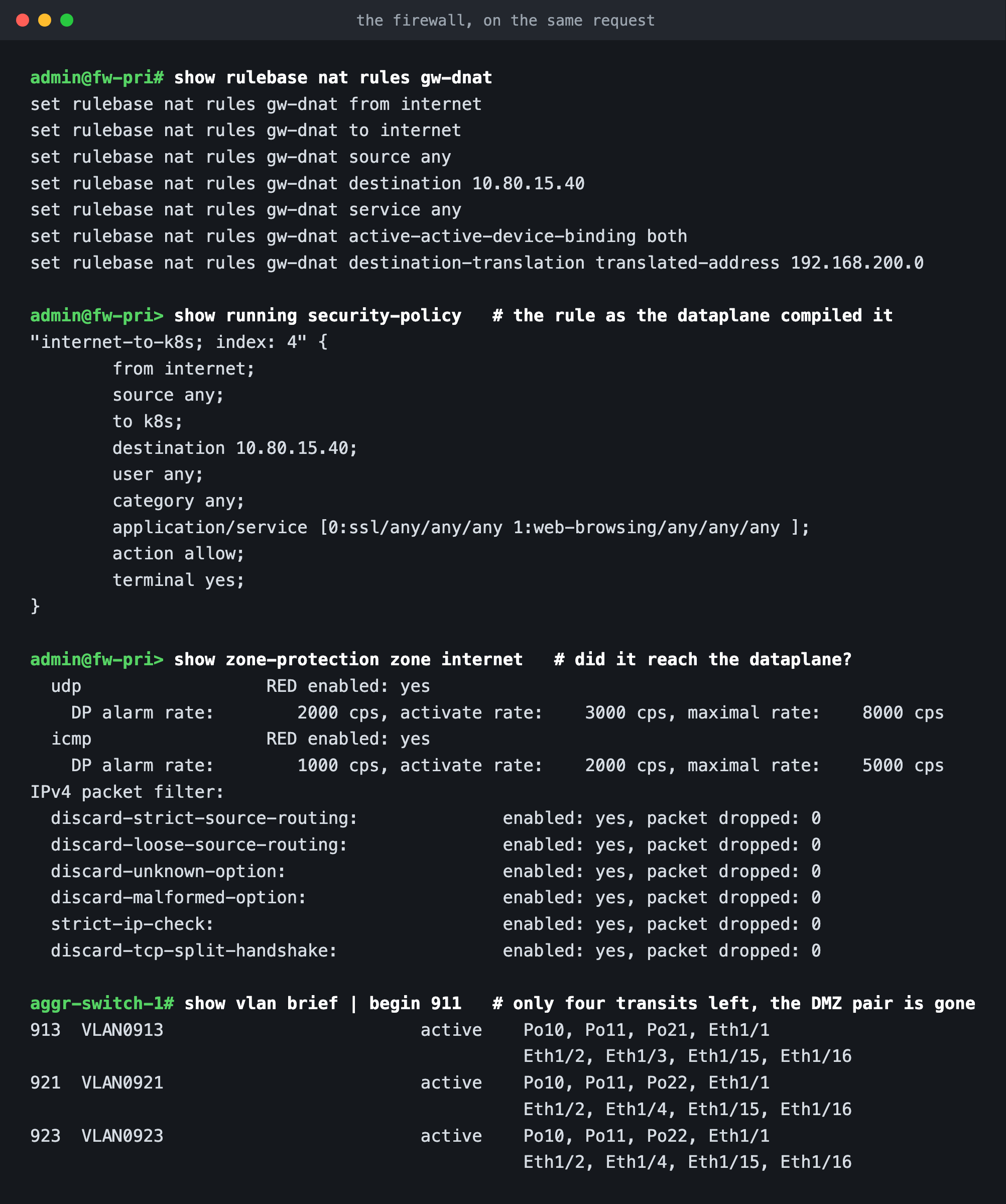
The NAT rule is the whole publishing story in one line: one outside address, translated to the cluster VIP, bound to both members of the Active/Active pair so either can service the session.
The second command earns more attention than it looks like it deserves. show running security-policy prints the rule as the dataplane actually compiled it, not as it was typed, and there you can see application/service [0:ssl/any/any/any 1:web-browsing/any/any/any ]. The published address only ever serves web, so the rule says only web. Reading the compiled policy rather than the candidate is a habit I would recommend picking up: a firewall will happily accept configuration it then quietly declines to enforce, and this is the view that tells you.
Zone protection is next, and the same principle applies: those counters are proof it is loaded rather than merely saved. Flood thresholds, the source routing and malformed option drops, strict IP checking, all of it live. Then the aggregation switch, where the transit VLAN list is now four entries rather than six, because two of them belonged to a tenant that no longer exists.
The configuration
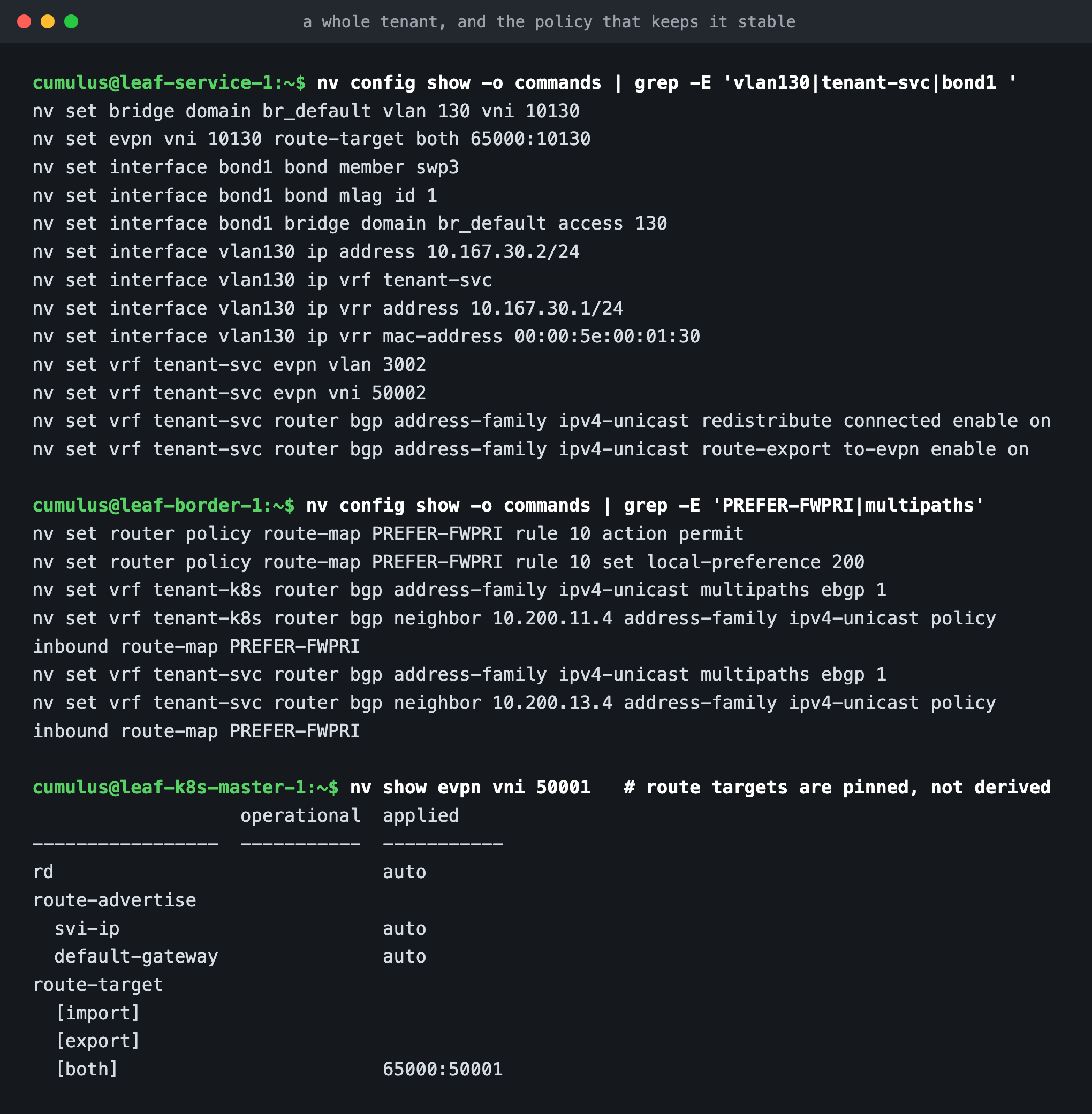
A whole tenant comes to a dozen or so lines of NVUE, the Cumulus Linux configuration front end: a bond down to the host, a VLAN, a VRR gateway, an L3VNI, and route export into EVPN. Route targets are pinned to 65000:VNI rather than derived from the local ASN. Each leaf pair runs a different ASN, so a derived target would differ from pair to pair; pinning them keeps the import and export lists identical on every leaf. You can check it with nv show evpn vni 50001, which prints the target once under [both] as 65000:50001, the same on the master pair and the worker pair alike. This is the pinned half of the split from earlier: the VNI reports what I configured, while the route on the wire carries the value FRR derived.
The second block cost me an afternoon. The Palo Alto pair runs Active/Active, and with ECMP each firewall was seeing half of every flow and forwarding to its partner over the HA3 link whenever it did not own the session. HA3 on this platform is fixed at 1500 bytes, and PAN-OS 12.1 exposes no MTU setting for an HA interface. Small requests were fine. Large responses hung. Grafana's 60 KB login page timed out while its health endpoint answered instantly, which is a maddening combination to debug. The fix is that route map: pin each VRF to one firewall with local preference rather than leaving it to a tie break, and trade load sharing for something that works.
What I would take away
Read the routes, then read the wire, and check the two agree. The router MAC in a type-2 route should turn up as the inner destination MAC in your capture. The FDB entry should name the VTEP the packet is really sent to. When those line up, the fabric is doing what you think it is. And when something works for small requests but hangs on big ones, stop reading application logs and go measure the path, because it is nearly always a hop that cannot carry what the two ends agreed between themselves.
If you want to rebuild any of this, what follows came straight off the devices, with credentials and keys removed, plus the Kubernetes manifest for the filtering tier. Between those and the commands in the screenshots, there is nothing here you cannot reproduce and check for yourself.
Device configurations
spine-1 (NVIDIA Cumulus Linux, NVUE)
nv set evpn enable on
nv set interface eth0 ip address 172.29.129.189/24
nv set interface eth0 ip gateway 172.29.129.254
nv set interface eth0 ip vrf mgmt
nv set interface eth0 type eth
nv set interface lo ip address 10.0.0.1/32
nv set interface lo type loopback
nv set interface swp1-8 link mtu 9216
nv set interface swp1-8 type swp
nv set nve vxlan enable on
nv set router bgp autonomous-system 65100
nv set router bgp enable on
nv set router bgp router-id 10.0.0.1
nv set service ntp mgmt server 0.cumulusnetworks.pool.ntp.org
nv set service ntp mgmt server 1.cumulusnetworks.pool.ntp.org
nv set service ntp mgmt server 2.cumulusnetworks.pool.ntp.org
nv set service ntp mgmt server 3.cumulusnetworks.pool.ntp.org
nv set system aaa class nvapply action allow
nv set system aaa class nvapply command-path / permission all
nv set system aaa class nvshow action allow
nv set system aaa class nvshow command-path / permission ro
nv set system aaa class sudo action allow
nv set system aaa class sudo command-path / permission all
nv set system aaa role nvue-admin class nvapply
nv set system aaa role nvue-monitor class nvshow
nv set system aaa role system-admin class nvapply
nv set system aaa role system-admin class sudo
nv set system aaa user cumulus full-name cumulus,,,
nv set system aaa user cumulus hashed-password <redacted>
nv set system aaa user cumulus role system-admin
nv set system api state enabled
nv set system config auto-save state enabled
nv set system control-plane acl acl-default-dos inbound
nv set system control-plane acl acl-default-whitelist inbound
nv set system hostname spine-1
nv set system reboot mode cold
nv set system snmp-server listening-address all vrf mgmt
nv set system snmp-server readonly-community '$nvsec$9cb7a999fcb470bcd67cf6b040983cbc' access any
nv set system snmp-server state enabled
nv set system snmp-server trap-destination 172.29.129.28 vrf mgmt community-password <redacted>
nv set system ssh-server state enabled
nv set system wjh channel forwarding trigger l2
nv set system wjh channel forwarding trigger l3
nv set system wjh channel forwarding trigger tunnel
nv set system wjh enable on
nv set vrf default router bgp address-family ipv4-unicast enable on
nv set vrf default router bgp address-family ipv4-unicast redistribute connected enable on
nv set vrf default router bgp address-family l2vpn-evpn enable on
nv set vrf default router bgp enable on
nv set vrf default router bgp neighbor swp1 address-family l2vpn-evpn enable on
nv set vrf default router bgp neighbor swp1 remote-as external
nv set vrf default router bgp neighbor swp1 type unnumbered
nv set vrf default router bgp neighbor swp2 address-family l2vpn-evpn enable on
nv set vrf default router bgp neighbor swp2 remote-as external
nv set vrf default router bgp neighbor swp2 type unnumbered
nv set vrf default router bgp neighbor swp3 address-family l2vpn-evpn enable on
nv set vrf default router bgp neighbor swp3 remote-as external
nv set vrf default router bgp neighbor swp3 type unnumbered
nv set vrf default router bgp neighbor swp4 address-family l2vpn-evpn enable on
nv set vrf default router bgp neighbor swp4 remote-as external
nv set vrf default router bgp neighbor swp4 type unnumbered
nv set vrf default router bgp neighbor swp5 address-family l2vpn-evpn enable on
nv set vrf default router bgp neighbor swp5 remote-as external
nv set vrf default router bgp neighbor swp5 type unnumbered
nv set vrf default router bgp neighbor swp6 address-family l2vpn-evpn enable on
nv set vrf default router bgp neighbor swp6 remote-as external
nv set vrf default router bgp neighbor swp6 type unnumbered
nv set vrf default router bgp neighbor swp7 address-family l2vpn-evpn enable on
nv set vrf default router bgp neighbor swp7 remote-as external
nv set vrf default router bgp neighbor swp7 type unnumbered
nv set vrf default router bgp neighbor swp8 address-family l2vpn-evpn enable on
nv set vrf default router bgp neighbor swp8 remote-as external
nv set vrf default router bgp neighbor swp8 type unnumbered
leaf-k8s-master-1 (host leaf: MLAG, L2VNI 10110, L3VNI 50001, Cilium BGP peers)
nv set bridge domain br_default vlan 110 vni 10110
nv set evpn enable on
nv set evpn vni 10110 route-target both 65000:10110
nv set evpn vni 50001 route-target both 65000:50001
nv set interface bond1 bond member swp3
nv set interface bond1 bond mlag id 1
nv set interface bond1-3 bond mlag enable on
nv set interface bond1-3 bridge domain br_default access 110
nv set interface bond1-3 type bond
nv set interface bond1-3,peerlink,swp1-2,vlan110 link mtu 9216
nv set interface bond2 bond member swp4
nv set interface bond2 bond mlag id 2
nv set interface bond3 bond member swp5
nv set interface bond3 bond mlag id 3
nv set interface eth0 ip address 172.29.129.59/24
nv set interface eth0 ip gateway 172.29.129.254
nv set interface eth0 ip vrf mgmt
nv set interface eth0 type eth
nv set interface lo ip address 10.0.0.11/32
nv set interface lo type loopback
nv set interface peerlink bond member swp15-16
nv set interface peerlink bridge domain br_default vlan 110,3001
nv set interface peerlink type peerlink
nv set interface peerlink.4094 base-interface peerlink
nv set interface peerlink.4094 type sub
nv set interface peerlink.4094 vlan 4094
nv set interface swp1-2 type swp
nv set interface vlan110 ip address 10.167.10.2/24
nv set interface vlan110 ip vrf tenant-k8s
nv set interface vlan110 ip vrr address 10.167.10.1/24
nv set interface vlan110 ip vrr enable on
nv set interface vlan110 ip vrr mac-address 00:00:5e:00:01:10
nv set interface vlan110 ip vrr state up
nv set interface vlan110 type svi
nv set interface vlan110 vlan 110
nv set mlag backup 172.29.129.247 vrf mgmt
nv set mlag enable on
nv set mlag init-delay 10
nv set mlag mac-address 44:38:39:BE:EF:11
nv set mlag peer-ip linklocal
nv set mlag priority 1000
nv set nve vxlan enable on
nv set nve vxlan mlag shared-address 10.0.0.101
nv set nve vxlan source address 10.0.0.11
nv set router bgp autonomous-system 65111
nv set router bgp enable on
nv set router bgp router-id 10.0.0.11
nv set router vrr enable on
nv set service ntp mgmt server 0.cumulusnetworks.pool.ntp.org
nv set service ntp mgmt server 1.cumulusnetworks.pool.ntp.org
nv set service ntp mgmt server 2.cumulusnetworks.pool.ntp.org
nv set service ntp mgmt server 3.cumulusnetworks.pool.ntp.org
nv set system aaa class nvapply action allow
nv set system aaa class nvapply command-path / permission all
nv set system aaa class nvshow action allow
nv set system aaa class nvshow command-path / permission ro
nv set system aaa class sudo action allow
nv set system aaa class sudo command-path / permission all
nv set system aaa role nvue-admin class nvapply
nv set system aaa role nvue-monitor class nvshow
nv set system aaa role system-admin class nvapply
nv set system aaa role system-admin class sudo
nv set system aaa user cumulus full-name cumulus,,,
nv set system aaa user cumulus hashed-password <redacted>
nv set system aaa user cumulus role system-admin
nv set system api state enabled
nv set system config auto-save state enabled
nv set system control-plane acl acl-default-dos inbound
nv set system control-plane acl acl-default-whitelist inbound
nv set system hostname leaf-k8s-master-1
nv set system reboot mode cold
nv set system snmp-server listening-address all vrf mgmt
nv set system snmp-server readonly-community '$nvsec$9cb7a999fcb470bcd67cf6b040983cbc' access any
nv set system snmp-server state enabled
nv set system snmp-server trap-destination 172.29.129.28 vrf mgmt community-password <redacted>
nv set system ssh-server state enabled
nv set system wjh channel forwarding trigger l2
nv set system wjh channel forwarding trigger l3
nv set system wjh channel forwarding trigger tunnel
nv set system wjh enable on
nv set vrf default router bgp address-family ipv4-unicast enable on
nv set vrf default router bgp address-family ipv4-unicast redistribute connected enable on
nv set vrf default router bgp address-family l2vpn-evpn enable on
nv set vrf default router bgp enable on
nv set vrf default router bgp neighbor swp1 address-family ipv4-unicast aspath allow-my-asn enable on
nv set vrf default router bgp neighbor swp1 address-family ipv4-unicast aspath allow-my-asn occurrences 1
nv set vrf default router bgp neighbor swp1 address-family l2vpn-evpn aspath allow-my-asn enable on
nv set vrf default router bgp neighbor swp1 address-family l2vpn-evpn aspath allow-my-asn occurrences 1
nv set vrf default router bgp neighbor swp1 address-family l2vpn-evpn enable on
nv set vrf default router bgp neighbor swp1 remote-as external
nv set vrf default router bgp neighbor swp1 type unnumbered
nv set vrf default router bgp neighbor swp2 address-family ipv4-unicast aspath allow-my-asn enable on
nv set vrf default router bgp neighbor swp2 address-family ipv4-unicast aspath allow-my-asn occurrences 1
nv set vrf default router bgp neighbor swp2 address-family l2vpn-evpn aspath allow-my-asn enable on
nv set vrf default router bgp neighbor swp2 address-family l2vpn-evpn aspath allow-my-asn occurrences 1
nv set vrf default router bgp neighbor swp2 address-family l2vpn-evpn enable on
nv set vrf default router bgp neighbor swp2 remote-as external
nv set vrf default router bgp neighbor swp2 type unnumbered
nv set vrf tenant-k8s evpn enable on
nv set vrf tenant-k8s evpn vlan 3001
nv set vrf tenant-k8s evpn vni 50001
nv set vrf tenant-k8s router bgp address-family ipv4-unicast enable on
nv set vrf tenant-k8s router bgp address-family ipv4-unicast redistribute connected enable on
nv set vrf tenant-k8s router bgp address-family ipv4-unicast route-export to-evpn enable on
nv set vrf tenant-k8s router bgp enable on
nv set vrf tenant-k8s router bgp neighbor 10.167.10.11 remote-as 65010
nv set vrf tenant-k8s router bgp neighbor 10.167.10.11 type numbered
nv set vrf tenant-k8s router bgp neighbor 10.167.10.12 remote-as 65010
nv set vrf tenant-k8s router bgp neighbor 10.167.10.12 type numbered
nv set vrf tenant-k8s router bgp neighbor 10.167.10.13 remote-as 65010
nv set vrf tenant-k8s router bgp neighbor 10.167.10.13 type numbered
leaf-service-1 (service leaf: VLAN 130, L2VNI 10130, L3VNI 50002)
nv set bridge domain br_default vlan 130 vni 10130
nv set evpn enable on
nv set evpn vni 10130 route-target both 65000:10130
nv set evpn vni 50002 route-target both 65000:50002
nv set interface bond1 bond member swp3
nv set interface bond1 bond mlag enable on
nv set interface bond1 bond mlag id 1
nv set interface bond1 bridge domain br_default access 130
nv set interface bond1 type bond
nv set interface bond1,peerlink,swp1-2,vlan130 link mtu 9216
nv set interface eth0 ip address 172.29.129.52/24
nv set interface eth0 ip gateway 172.29.129.254
nv set interface eth0 ip vrf mgmt
nv set interface eth0 type eth
nv set interface lo ip address 10.0.0.15/32
nv set interface lo type loopback
nv set interface peerlink bond member swp15-16
nv set interface peerlink bridge domain br_default vlan 130,3002
nv set interface peerlink type peerlink
nv set interface peerlink.4094 base-interface peerlink
nv set interface peerlink.4094 type sub
nv set interface peerlink.4094 vlan 4094
nv set interface swp1-2 type swp
nv set interface vlan130 ip address 10.167.30.2/24
nv set interface vlan130 ip vrf tenant-svc
nv set interface vlan130 ip vrr address 10.167.30.1/24
nv set interface vlan130 ip vrr enable on
nv set interface vlan130 ip vrr mac-address 00:00:5e:00:01:30
nv set interface vlan130 ip vrr state up
nv set interface vlan130 type svi
nv set interface vlan130 vlan 130
nv set mlag backup 172.29.129.1 vrf mgmt
nv set mlag enable on
nv set mlag init-delay 10
nv set mlag mac-address 44:38:39:BE:EF:13
nv set mlag peer-ip linklocal
nv set mlag priority 1000
nv set nve vxlan enable on
nv set nve vxlan mlag shared-address 10.0.0.103
nv set nve vxlan source address 10.0.0.15
nv set router bgp autonomous-system 65113
nv set router bgp enable on
nv set router bgp router-id 10.0.0.15
nv set router vrr enable on
nv set service ntp mgmt server 0.cumulusnetworks.pool.ntp.org
nv set service ntp mgmt server 1.cumulusnetworks.pool.ntp.org
nv set service ntp mgmt server 2.cumulusnetworks.pool.ntp.org
nv set service ntp mgmt server 3.cumulusnetworks.pool.ntp.org
nv set system aaa class nvapply action allow
nv set system aaa class nvapply command-path / permission all
nv set system aaa class nvshow action allow
nv set system aaa class nvshow command-path / permission ro
nv set system aaa class sudo action allow
nv set system aaa class sudo command-path / permission all
nv set system aaa role nvue-admin class nvapply
nv set system aaa role nvue-monitor class nvshow
nv set system aaa role system-admin class nvapply
nv set system aaa role system-admin class sudo
nv set system aaa user cumulus full-name cumulus,,,
nv set system aaa user cumulus hashed-password <redacted>
nv set system aaa user cumulus role system-admin
nv set system api state enabled
nv set system config auto-save state enabled
nv set system control-plane acl acl-default-dos inbound
nv set system control-plane acl acl-default-whitelist inbound
nv set system hostname leaf-service-1
nv set system reboot mode cold
nv set system snmp-server listening-address all vrf mgmt
nv set system snmp-server readonly-community '$nvsec$9cb7a999fcb470bcd67cf6b040983cbc' access any
nv set system snmp-server state enabled
nv set system snmp-server trap-destination 172.29.129.28 vrf mgmt community-password <redacted>
nv set system ssh-server state enabled
nv set system wjh channel forwarding trigger l2
nv set system wjh channel forwarding trigger l3
nv set system wjh channel forwarding trigger tunnel
nv set system wjh enable on
nv set vrf default router bgp address-family ipv4-unicast enable on
nv set vrf default router bgp address-family ipv4-unicast redistribute connected enable on
nv set vrf default router bgp address-family l2vpn-evpn enable on
nv set vrf default router bgp enable on
nv set vrf default router bgp neighbor swp1 address-family ipv4-unicast aspath allow-my-asn enable on
nv set vrf default router bgp neighbor swp1 address-family ipv4-unicast aspath allow-my-asn occurrences 1
nv set vrf default router bgp neighbor swp1 address-family l2vpn-evpn aspath allow-my-asn enable on
nv set vrf default router bgp neighbor swp1 address-family l2vpn-evpn aspath allow-my-asn occurrences 1
nv set vrf default router bgp neighbor swp1 address-family l2vpn-evpn enable on
nv set vrf default router bgp neighbor swp1 remote-as external
nv set vrf default router bgp neighbor swp1 type unnumbered
nv set vrf default router bgp neighbor swp2 address-family ipv4-unicast aspath allow-my-asn enable on
nv set vrf default router bgp neighbor swp2 address-family ipv4-unicast aspath allow-my-asn occurrences 1
nv set vrf default router bgp neighbor swp2 address-family l2vpn-evpn aspath allow-my-asn enable on
nv set vrf default router bgp neighbor swp2 address-family l2vpn-evpn aspath allow-my-asn occurrences 1
nv set vrf default router bgp neighbor swp2 address-family l2vpn-evpn enable on
nv set vrf default router bgp neighbor swp2 remote-as external
nv set vrf default router bgp neighbor swp2 type unnumbered
nv set vrf tenant-svc evpn enable on
nv set vrf tenant-svc evpn vlan 3002
nv set vrf tenant-svc evpn vni 50002
nv set vrf tenant-svc router bgp address-family ipv4-unicast enable on
nv set vrf tenant-svc router bgp address-family ipv4-unicast redistribute connected enable on
nv set vrf tenant-svc router bgp address-family ipv4-unicast route-export to-evpn enable on
nv set vrf tenant-svc router bgp enable on
leaf-border-1 (border leaf: transit VLANs, firewall peering, local preference policy)
nv set bridge domain br_default vlan 911,913,921,923
nv set evpn enable on
nv set evpn vni 50001 route-target both 65000:50001
nv set evpn vni 50002 route-target both 65000:50002
nv set interface bondaggr bond member swp3-4
nv set interface bondaggr bond mlag enable on
nv set interface bondaggr bond mlag id 11
nv set interface bondaggr bridge domain br_default vlan 911,913,921,923
nv set interface bondaggr type bond
nv set interface bondaggr,peerlink,swp1-2,vlan911,913,921,923 link mtu 9216
nv set interface eth0 ip address 172.29.129.175/24
nv set interface eth0 ip gateway 172.29.129.254
nv set interface eth0 ip vrf mgmt
nv set interface eth0 type eth
nv set interface lo ip address 10.0.0.17/32
nv set interface lo type loopback
nv set interface peerlink bond member swp15-16
nv set interface peerlink bridge domain br_default vlan 911,913,921,923,3001-3002
nv set interface peerlink type peerlink
nv set interface peerlink.4094 base-interface peerlink
nv set interface peerlink.4094 type sub
nv set interface peerlink.4094 vlan 4094
nv set interface swp1-2 type swp
nv set interface vlan911 ip address 10.200.11.1/29
nv set interface vlan911 vlan 911
nv set interface vlan911,913,921,923 type svi
nv set interface vlan911,921 ip vrf tenant-k8s
nv set interface vlan913 ip address 10.200.13.1/29
nv set interface vlan913 vlan 913
nv set interface vlan913,923 ip vrf tenant-svc
nv set interface vlan921 ip address 10.200.21.1/29
nv set interface vlan921 vlan 921
nv set interface vlan923 ip address 10.200.23.1/29
nv set interface vlan923 vlan 923
nv set mlag backup 172.29.129.110 vrf mgmt
nv set mlag enable on
nv set mlag init-delay 10
nv set mlag mac-address 44:38:39:BE:EF:14
nv set mlag peer-ip linklocal
nv set mlag priority 1000
nv set nve vxlan enable on
nv set nve vxlan mlag shared-address 10.0.0.104
nv set nve vxlan source address 10.0.0.17
nv set router bgp autonomous-system 65114
nv set router bgp enable on
nv set router bgp router-id 10.0.0.17
nv set router policy route-map PREFER-FWPRI rule 10 action permit
nv set router policy route-map PREFER-FWPRI rule 10 set local-preference 200
nv set service ntp mgmt server 0.cumulusnetworks.pool.ntp.org
nv set service ntp mgmt server 1.cumulusnetworks.pool.ntp.org
nv set service ntp mgmt server 2.cumulusnetworks.pool.ntp.org
nv set service ntp mgmt server 3.cumulusnetworks.pool.ntp.org
nv set system aaa class nvapply action allow
nv set system aaa class nvapply command-path / permission all
nv set system aaa class nvshow action allow
nv set system aaa class nvshow command-path / permission ro
nv set system aaa class sudo action allow
nv set system aaa class sudo command-path / permission all
nv set system aaa role nvue-admin class nvapply
nv set system aaa role nvue-monitor class nvshow
nv set system aaa role system-admin class nvapply
nv set system aaa role system-admin class sudo
nv set system aaa user cumulus full-name cumulus,,,
nv set system aaa user cumulus hashed-password <redacted>
nv set system aaa user cumulus role system-admin
nv set system api state enabled
nv set system config auto-save state enabled
nv set system control-plane acl acl-default-dos inbound
nv set system control-plane acl acl-default-whitelist inbound
nv set system hostname leaf-border-1
nv set system reboot mode cold
nv set system snmp-server listening-address all vrf mgmt
nv set system snmp-server readonly-community '$nvsec$9cb7a999fcb470bcd67cf6b040983cbc' access any
nv set system snmp-server state enabled
nv set system snmp-server trap-destination 172.29.129.28 vrf mgmt community-password <redacted>
nv set system ssh-server state enabled
nv set system wjh channel forwarding trigger l2
nv set system wjh channel forwarding trigger l3
nv set system wjh channel forwarding trigger tunnel
nv set system wjh enable on
nv set vrf default router bgp address-family ipv4-unicast enable on
nv set vrf default router bgp address-family ipv4-unicast redistribute connected enable on
nv set vrf default router bgp address-family l2vpn-evpn enable on
nv set vrf default router bgp enable on
nv set vrf default router bgp neighbor swp1 address-family ipv4-unicast aspath allow-my-asn enable on
nv set vrf default router bgp neighbor swp1 address-family ipv4-unicast aspath allow-my-asn occurrences 1
nv set vrf default router bgp neighbor swp1 address-family l2vpn-evpn aspath allow-my-asn enable on
nv set vrf default router bgp neighbor swp1 address-family l2vpn-evpn aspath allow-my-asn occurrences 1
nv set vrf default router bgp neighbor swp1 address-family l2vpn-evpn enable on
nv set vrf default router bgp neighbor swp1 remote-as external
nv set vrf default router bgp neighbor swp1 type unnumbered
nv set vrf default router bgp neighbor swp2 address-family ipv4-unicast aspath allow-my-asn enable on
nv set vrf default router bgp neighbor swp2 address-family ipv4-unicast aspath allow-my-asn occurrences 1
nv set vrf default router bgp neighbor swp2 address-family l2vpn-evpn aspath allow-my-asn enable on
nv set vrf default router bgp neighbor swp2 address-family l2vpn-evpn aspath allow-my-asn occurrences 1
nv set vrf default router bgp neighbor swp2 address-family l2vpn-evpn enable on
nv set vrf default router bgp neighbor swp2 remote-as external
nv set vrf default router bgp neighbor swp2 type unnumbered
nv set vrf tenant-k8s evpn enable on
nv set vrf tenant-k8s evpn vlan 3001
nv set vrf tenant-k8s evpn vni 50001
nv set vrf tenant-k8s router bgp address-family ipv4-unicast enable on
nv set vrf tenant-k8s router bgp address-family ipv4-unicast multipaths ebgp 1
nv set vrf tenant-k8s router bgp address-family ipv4-unicast redistribute connected enable on
nv set vrf tenant-k8s router bgp address-family ipv4-unicast route-export to-evpn enable on
nv set vrf tenant-k8s router bgp enable on
nv set vrf tenant-k8s router bgp neighbor 10.200.11.4 address-family ipv4-unicast policy inbound route-map PREFER-FWPRI
nv set vrf tenant-k8s router bgp neighbor 10.200.11.4 remote-as 65300
nv set vrf tenant-k8s router bgp neighbor 10.200.11.4 timers hold 3
nv set vrf tenant-k8s router bgp neighbor 10.200.11.4 timers keepalive 1
nv set vrf tenant-k8s router bgp neighbor 10.200.11.4 type numbered
nv set vrf tenant-k8s router bgp neighbor 10.200.21.4 remote-as 65300
nv set vrf tenant-k8s router bgp neighbor 10.200.21.4 timers hold 3
nv set vrf tenant-k8s router bgp neighbor 10.200.21.4 timers keepalive 1
nv set vrf tenant-k8s router bgp neighbor 10.200.21.4 type numbered
nv set vrf tenant-svc evpn enable on
nv set vrf tenant-svc evpn vlan 3002
nv set vrf tenant-svc evpn vni 50002
nv set vrf tenant-svc router bgp address-family ipv4-unicast enable on
nv set vrf tenant-svc router bgp address-family ipv4-unicast multipaths ebgp 1
nv set vrf tenant-svc router bgp address-family ipv4-unicast redistribute connected enable on
nv set vrf tenant-svc router bgp address-family ipv4-unicast route-export to-evpn enable on
nv set vrf tenant-svc router bgp enable on
nv set vrf tenant-svc router bgp neighbor 10.200.13.4 address-family ipv4-unicast policy inbound route-map PREFER-FWPRI
nv set vrf tenant-svc router bgp neighbor 10.200.13.4 remote-as 65300
nv set vrf tenant-svc router bgp neighbor 10.200.13.4 timers hold 3
nv set vrf tenant-svc router bgp neighbor 10.200.13.4 timers keepalive 1
nv set vrf tenant-svc router bgp neighbor 10.200.13.4 type numbered
nv set vrf tenant-svc router bgp neighbor 10.200.23.4 remote-as 65300
nv set vrf tenant-svc router bgp neighbor 10.200.23.4 timers hold 3
nv set vrf tenant-svc router bgp neighbor 10.200.23.4 timers keepalive 1
nv set vrf tenant-svc router bgp neighbor 10.200.23.4 type numbered
aggr-switch-1 (Cisco NX-OS, vPC to the firewalls)
vdc aggr-switch-1 id 1
  limit-resource vlan minimum 16 maximum 4094
  limit-resource vrf minimum 2 maximum 4096
  limit-resource port-channel minimum 0 maximum 511
  limit-resource m4route-mem minimum 58 maximum 58
  limit-resource m6route-mem minimum 8 maximum 8
cfs eth distribute
feature lacp
feature vpc
username admin password <redacted>
username admin sshkey <redacted>
ip domain-lookup
copp profile strict
snmp-server user admin network-admin auth md5 331CB7847A87BAA3C94260E0C3E239CC282A priv aes-128 054EEFC45B87EDB38D1E27A0C5EB34EC0707 localizedV2key
snmp-server host 172.29.129.28 traps version 2c public
snmp-server host 172.29.129.28 use-vrf management
rmon event 1 log trap public description FATAL(1) owner PMON@FATAL
rmon event 2 log trap public description CRITICAL(2) owner PMON@CRITICAL
rmon event 3 log trap public description ERROR(3) owner PMON@ERROR
rmon event 4 log trap public description WARNING(4) owner PMON@WARNING
rmon event 5 log trap public description INFORMATION(5) owner PMON@INFO
snmp-server enable traps callhome event-notify
snmp-server enable traps callhome smtp-send-fail
snmp-server enable traps cfs state-change-notif
snmp-server enable traps cfs merge-failure
snmp-server enable traps aaa server-state-change
snmp-server enable traps feature-control FeatureOpStatusChange
snmp-server enable traps sysmgr cseFailSwCoreNotifyExtended
snmp-server enable traps config ccmCLIRunningConfigChanged
snmp-server enable traps snmp authentication
snmp-server enable traps link cisco-xcvr-mon-status-chg
snmp-server enable traps vtp notifs
snmp-server enable traps vtp vlancreate
snmp-server enable traps vtp vlandelete
snmp-server enable traps bridge newroot
snmp-server enable traps bridge topologychange
snmp-server enable traps stpx inconsistency
snmp-server enable traps stpx root-inconsistency
snmp-server enable traps stpx loop-inconsistency
snmp-server enable traps system Clock-change-notification
snmp-server enable traps feature-control ciscoFeatOpStatusChange
snmp-server enable traps mmode cseNormalModeChangeNotify
snmp-server enable traps mmode cseMaintModeChangeNotify
snmp-server enable traps syslog message-generated
snmp-server community public group network-operator
vlan 1,911,913,921,923
vrf context management
vrf context vpc-keepalive
vpc domain 1
  peer-keepalive destination 10.99.99.2 source 10.99.99.1 vrf vpc-keepalive
interface port-channel10
  switchport mode trunk
  switchport trunk allowed vlan 911,913,921,923
  spanning-tree port type network
  vpc peer-link
interface port-channel11
  switchport mode trunk
  switchport trunk allowed vlan 911,913,921,923
  mtu 9216
  vpc 11
interface port-channel21
  switchport mode trunk
  switchport trunk allowed vlan 911,913
  mtu 9216
  vpc 21
interface port-channel22
  switchport mode trunk
  switchport trunk allowed vlan 921,923
  mtu 9216
  vpc 22
interface Ethernet1/1
  switchport mode trunk
  switchport trunk allowed vlan 911,913,921,923
  mtu 9216
  channel-group 11 mode active
interface Ethernet1/2
  switchport mode trunk
  switchport trunk allowed vlan 911,913,921,923
  mtu 9216
  channel-group 11 mode active
interface Ethernet1/3
  switchport mode trunk
  switchport trunk allowed vlan 911,913
  mtu 9216
  channel-group 21 mode active
interface Ethernet1/4
  switchport mode trunk
  switchport trunk allowed vlan 921,923
  mtu 9216
  channel-group 22 mode active
interface Ethernet1/5
interface Ethernet1/6
interface Ethernet1/7
interface Ethernet1/8
interface Ethernet1/9
interface Ethernet1/10
interface Ethernet1/11
interface Ethernet1/12
interface Ethernet1/13
interface Ethernet1/14
  no switchport
  vrf member vpc-keepalive
  ip address 10.99.99.1/30
  no shutdown
interface Ethernet1/15
  switchport mode trunk
  switchport trunk allowed vlan 911,913,921,923
  channel-group 10 mode active
interface Ethernet1/16
  switchport mode trunk
  switchport trunk allowed vlan 911,913,921,923
  channel-group 10 mode active
interface Ethernet1/17
interface Ethernet1/18
interface Ethernet1/19
interface Ethernet1/20
interface Ethernet1/21
interface Ethernet1/22
interface Ethernet1/23
interface Ethernet1/24
interface Ethernet1/25
interface Ethernet1/26
interface Ethernet1/27
interface Ethernet1/28
interface Ethernet1/29
interface Ethernet1/30
interface Ethernet1/31
interface Ethernet1/32
interface Ethernet1/33
interface Ethernet1/34
interface Ethernet1/35
interface Ethernet1/36
interface Ethernet1/37
interface Ethernet1/38
interface Ethernet1/39
interface Ethernet1/40
interface Ethernet1/41
interface Ethernet1/42
interface Ethernet1/43
interface Ethernet1/44
interface Ethernet1/45
interface Ethernet1/46
interface Ethernet1/47
interface Ethernet1/48
interface Ethernet1/49
interface Ethernet1/50
interface Ethernet1/51
interface Ethernet1/52
interface Ethernet1/53
interface Ethernet1/54
interface Ethernet1/55
interface Ethernet1/56
interface Ethernet1/57
interface Ethernet1/58
interface Ethernet1/59
interface Ethernet1/60
interface Ethernet1/61
interface Ethernet1/62
interface Ethernet1/63
interface Ethernet1/64
interface mgmt0
  vrf member management
  ip address 172.29.129.96/24
icam monitor scale
line console
  exec-timeout 0
line vty
  exec-timeout 0
no logging console
fw-pri (PAN-OS: interfaces and zones)
set network interface ethernet ethernet1/1 aggregate-group ae1
set network interface ethernet ethernet1/2 aggregate-group ae1
set network interface ethernet ethernet1/3 layer3 interface-management-profile ping-only
set network interface ethernet ethernet1/3 layer3 ip 10.80.15.21/24
set network interface ethernet ethernet1/5 ha
set network interface ethernet ethernet1/6 ha
set network interface ethernet ethernet1/7 ha
set network interface aggregate-ethernet ae1 layer3 units ae1.911 tag 911
set network interface aggregate-ethernet ae1 layer3 units ae1.911 mtu 9216
set network interface aggregate-ethernet ae1 layer3 units ae1.911 interface-management-profile ping-only
set network interface aggregate-ethernet ae1 layer3 units ae1.911 ip 10.200.11.4/29
set network interface aggregate-ethernet ae1 layer3 units ae1.913 tag 913
set network interface aggregate-ethernet ae1 layer3 units ae1.913 mtu 9216
set network interface aggregate-ethernet ae1 layer3 units ae1.913 interface-management-profile ping-only
set network interface aggregate-ethernet ae1 layer3 units ae1.913 ip 10.200.13.4/29
set network interface aggregate-ethernet ae1 layer3 mtu 9216
set network interface aggregate-ethernet ae1 layer3 lacp enable yes
set network interface aggregate-ethernet ae1 layer3 lacp mode active
set network interface aggregate-ethernet ae1 layer3 lacp transmission-rate fast
set network profiles monitor-profile default interval 3
set network profiles monitor-profile default threshold 5
set network profiles monitor-profile default action wait-recover
set network profiles interface-management-profile ping-only ping yes
set network profiles zone-protection-profile zp-internet flood tcp-syn enable yes
set network profiles zone-protection-profile zp-internet flood tcp-syn red activate-rate 3000
set network profiles zone-protection-profile zp-internet flood tcp-syn red alarm-rate 2000
set network profiles zone-protection-profile zp-internet flood tcp-syn red maximal-rate 8000
set network profiles zone-protection-profile zp-internet flood udp enable yes
set network profiles zone-protection-profile zp-internet flood udp red activate-rate 3000
set network profiles zone-protection-profile zp-internet flood udp red alarm-rate 2000
set network profiles zone-protection-profile zp-internet flood udp red maximal-rate 8000
set network profiles zone-protection-profile zp-internet flood icmp enable yes
set network profiles zone-protection-profile zp-internet flood icmp red activate-rate 2000
set network profiles zone-protection-profile zp-internet flood icmp red alarm-rate 1000
set network profiles zone-protection-profile zp-internet flood icmp red maximal-rate 5000
set network profiles zone-protection-profile zp-internet scan 8003 action block-ip track-by source
set network profiles zone-protection-profile zp-internet scan 8003 action block-ip duration 600
set network profiles zone-protection-profile zp-internet scan 8003 interval 10
set network profiles zone-protection-profile zp-internet scan 8003 threshold 100
set network profiles zone-protection-profile zp-internet scan 8001 action block-ip track-by source
set network profiles zone-protection-profile zp-internet scan 8001 action block-ip duration 600
set network profiles zone-protection-profile zp-internet scan 8001 interval 10
set network profiles zone-protection-profile zp-internet scan 8001 threshold 100
set network profiles zone-protection-profile zp-internet scan 8002 action alert
set network profiles zone-protection-profile zp-internet scan 8002 interval 10
set network profiles zone-protection-profile zp-internet scan 8002 threshold 100
set network profiles zone-protection-profile zp-internet scan 8006 action alert
set network profiles zone-protection-profile zp-internet scan 8006 interval 10
set network profiles zone-protection-profile zp-internet scan 8006 threshold 100
set network profiles zone-protection-profile zp-internet strict-ip-check yes
set network profiles zone-protection-profile zp-internet discard-malformed-option yes
set network profiles zone-protection-profile zp-internet discard-unknown-option yes
set network profiles zone-protection-profile zp-internet discard-strict-source-routing yes
set network profiles zone-protection-profile zp-internet discard-loose-source-routing yes
set network profiles zone-protection-profile zp-internet discard-tcp-split-handshake yes
set network profiles zone-protection-profile zp-internet discard-tcp-syn-with-data yes
set network profiles zone-protection-profile zp-internet discard-tcp-synack-with-data yes
set network ike crypto-profiles ike-crypto-profiles default encryption [ aes-128-cbc 3des ]
set network ike crypto-profiles ike-crypto-profiles default hash sha1
set network ike crypto-profiles ike-crypto-profiles default dh-group group2
set network ike crypto-profiles ike-crypto-profiles default lifetime hours 8
set network ike crypto-profiles ike-crypto-profiles Suite-B-GCM-128 encryption aes-128-cbc
set network ike crypto-profiles ike-crypto-profiles Suite-B-GCM-128 hash sha256
set network ike crypto-profiles ike-crypto-profiles Suite-B-GCM-128 dh-group group19
set network ike crypto-profiles ike-crypto-profiles Suite-B-GCM-128 lifetime hours 8
set network ike crypto-profiles ike-crypto-profiles Suite-B-GCM-256 encryption aes-256-cbc
set network ike crypto-profiles ike-crypto-profiles Suite-B-GCM-256 hash sha384
set network ike crypto-profiles ike-crypto-profiles Suite-B-GCM-256 dh-group group20
set network ike crypto-profiles ike-crypto-profiles Suite-B-GCM-256 lifetime hours 8
set network ike crypto-profiles ipsec-crypto-profiles default esp encryption [ aes-128-cbc 3des ]
set network ike crypto-profiles ipsec-crypto-profiles default esp authentication sha1
set network ike crypto-profiles ipsec-crypto-profiles default dh-group group2
set network ike crypto-profiles ipsec-crypto-profiles default lifetime hours 1
set network ike crypto-profiles ipsec-crypto-profiles Suite-B-GCM-128 esp encryption aes-128-gcm
set network ike crypto-profiles ipsec-crypto-profiles Suite-B-GCM-128 esp authentication none
set network ike crypto-profiles ipsec-crypto-profiles Suite-B-GCM-128 dh-group group19
set network ike crypto-profiles ipsec-crypto-profiles Suite-B-GCM-128 lifetime hours 1
set network ike crypto-profiles ipsec-crypto-profiles Suite-B-GCM-256 esp encryption aes-256-gcm
set network ike crypto-profiles ipsec-crypto-profiles Suite-B-GCM-256 esp authentication none
set network ike crypto-profiles ipsec-crypto-profiles Suite-B-GCM-256 dh-group group20
set network ike crypto-profiles ipsec-crypto-profiles Suite-B-GCM-256 lifetime hours 1
set network ike crypto-profiles global-protect-app-crypto-profiles default encryption aes-128-cbc
set network ike crypto-profiles global-protect-app-crypto-profiles default authentication sha1
set network ike gateway
set network qos profile default class-bandwidth-type mbps class class1 priority real-time
set network qos profile default class-bandwidth-type mbps class class2 priority high
set network qos profile default class-bandwidth-type mbps class class3 priority high
set network qos profile default class-bandwidth-type mbps class class4 priority medium
set network qos profile default class-bandwidth-type mbps class class5 priority medium
set network qos profile default class-bandwidth-type mbps class class6 priority low
set network qos profile default class-bandwidth-type mbps class class7 priority low
set network qos profile default class-bandwidth-type mbps class class8 priority low
set network virtual-router default protocol bgp enable yes
set network virtual-router default protocol bgp router-id 10.200.11.4
set network virtual-router default protocol bgp local-as 65300
set network virtual-router default protocol bgp install-route yes
set network virtual-router default protocol bgp allow-redist-default-route yes
set network virtual-router default protocol bgp redist-rules default-route address-family-identifier ipv4
set network virtual-router default protocol bgp redist-rules default-route enable yes
set network virtual-router default protocol bgp peer-group fabric type ebgp remove-private-as no
set network virtual-router default protocol bgp peer-group fabric type ebgp import-nexthop original
set network virtual-router default protocol bgp peer-group fabric type ebgp export-nexthop resolve
set network virtual-router default protocol bgp peer-group fabric enable yes
set network virtual-router default protocol bgp peer-group fabric peer bl1-k8s peer-as 65114
set network virtual-router default protocol bgp peer-group fabric peer bl1-k8s enable yes
set network virtual-router default protocol bgp peer-group fabric peer bl1-k8s local-address interface ae1.911
set network virtual-router default protocol bgp peer-group fabric peer bl1-k8s local-address ip 10.200.11.4/29
set network virtual-router default protocol bgp peer-group fabric peer bl1-k8s peer-address ip 10.200.11.1
set network virtual-router default protocol bgp peer-group fabric peer bl1-k8s connection-options keep-alive-interval 1
set network virtual-router default protocol bgp peer-group fabric peer bl1-k8s connection-options hold-time 3
set network virtual-router default protocol bgp peer-group fabric peer bl2-k8s peer-as 65114
set network virtual-router default protocol bgp peer-group fabric peer bl2-k8s enable yes
set network virtual-router default protocol bgp peer-group fabric peer bl2-k8s local-address interface ae1.911
set network virtual-router default protocol bgp peer-group fabric peer bl2-k8s local-address ip 10.200.11.4/29
set network virtual-router default protocol bgp peer-group fabric peer bl2-k8s peer-address ip 10.200.11.2
set network virtual-router default protocol bgp peer-group fabric peer bl2-k8s connection-options keep-alive-interval 1
set network virtual-router default protocol bgp peer-group fabric peer bl2-k8s connection-options hold-time 3
set network virtual-router default protocol bgp peer-group fabric peer bl1-svc peer-as 65114
set network virtual-router default protocol bgp peer-group fabric peer bl1-svc enable yes
set network virtual-router default protocol bgp peer-group fabric peer bl1-svc local-address interface ae1.913
set network virtual-router default protocol bgp peer-group fabric peer bl1-svc local-address ip 10.200.13.4/29
set network virtual-router default protocol bgp peer-group fabric peer bl1-svc peer-address ip 10.200.13.1
set network virtual-router default protocol bgp peer-group fabric peer bl1-svc connection-options keep-alive-interval 1
set network virtual-router default protocol bgp peer-group fabric peer bl1-svc connection-options hold-time 3
set network virtual-router default protocol bgp peer-group fabric peer bl2-svc peer-as 65114
set network virtual-router default protocol bgp peer-group fabric peer bl2-svc enable yes
set network virtual-router default protocol bgp peer-group fabric peer bl2-svc local-address interface ae1.913
set network virtual-router default protocol bgp peer-group fabric peer bl2-svc local-address ip 10.200.13.4/29
set network virtual-router default protocol bgp peer-group fabric peer bl2-svc peer-address ip 10.200.13.2
set network virtual-router default protocol bgp peer-group fabric peer bl2-svc connection-options keep-alive-interval 1
set network virtual-router default protocol bgp peer-group fabric peer bl2-svc connection-options hold-time 3
set network virtual-router default protocol redist-profile default-route priority 1
set network virtual-router default protocol redist-profile default-route action redist
set network virtual-router default protocol redist-profile default-route filter type static
set network virtual-router default interface [ ae1.911 ae1.913 ethernet1/3 ]
set network virtual-router default routing-table ip static-route default destination 0.0.0.0/0
set network virtual-router default routing-table ip static-route default interface ethernet1/3
set network virtual-router default routing-table ip static-route default nexthop ip-address 10.80.15.1
set network tunnel ipsec
set network tunnel global-protect-gateway
set network tunnel global-protect-site-to-site
fw-pri (PAN-OS: virtual router, BGP, security and NAT policy)
set rulebase security rules k8s-to-svc from k8s
set rulebase security rules k8s-to-svc to svc
set rulebase security rules k8s-to-svc source any
set rulebase security rules k8s-to-svc destination any
set rulebase security rules k8s-to-svc application [ dns ntp ping ]
set rulebase security rules k8s-to-svc service application-default
set rulebase security rules k8s-to-svc action allow
set rulebase security rules k8s-to-internet from k8s
set rulebase security rules k8s-to-internet to internet
set rulebase security rules k8s-to-internet source any
set rulebase security rules k8s-to-internet destination any
set rulebase security rules k8s-to-internet application any
set rulebase security rules k8s-to-internet service any
set rulebase security rules k8s-to-internet action allow
set rulebase security rules svc-to-internet from svc
set rulebase security rules svc-to-internet to internet
set rulebase security rules svc-to-internet source any
set rulebase security rules svc-to-internet destination any
set rulebase security rules svc-to-internet application any
set rulebase security rules svc-to-internet service any
set rulebase security rules svc-to-internet action allow
set rulebase security rules internet-to-k8s from internet
set rulebase security rules internet-to-k8s to k8s
set rulebase security rules internet-to-k8s source any
set rulebase security rules internet-to-k8s destination 10.80.15.40
set rulebase security rules internet-to-k8s application [ ssl web-browsing ]
set rulebase security rules internet-to-k8s service any
set rulebase security rules internet-to-k8s action allow
set rulebase security rules internet-to-svc from internet
set rulebase security rules internet-to-svc to svc
set rulebase security rules internet-to-svc source any
set rulebase security rules internet-to-svc destination 10.80.15.41
set rulebase security rules internet-to-svc application dns
set rulebase security rules internet-to-svc service application-default
set rulebase security rules internet-to-svc action allow
set rulebase security rules svc-to-k8s from svc
set rulebase security rules svc-to-k8s to k8s
set rulebase security rules svc-to-k8s source any
set rulebase security rules svc-to-k8s destination 10.167.10.100
set rulebase security rules svc-to-k8s application any
set rulebase security rules svc-to-k8s service any
set rulebase security rules svc-to-k8s action allow
set rulebase security rules internet-to-api from internet
set rulebase security rules internet-to-api to k8s
set rulebase security rules internet-to-api source any
set rulebase security rules internet-to-api destination 10.80.15.40
set rulebase security rules internet-to-api service tcp-6443
set rulebase security rules internet-to-api application any
set rulebase security rules internet-to-api action allow
set rulebase security rules internet-to-api log-end yes
set rulebase nat rules fabric-snat from [ k8s svc ]
set rulebase nat rules fabric-snat to internet
set rulebase nat rules fabric-snat source any
set rulebase nat rules fabric-snat destination any
set rulebase nat rules fabric-snat service any
set rulebase nat rules fabric-snat active-active-device-binding 0
set rulebase nat rules fabric-snat source-translation dynamic-ip-and-port translated-address 10.80.15.21
set rulebase nat rules fabric-snat-1 from [ k8s svc ]
set rulebase nat rules fabric-snat-1 to internet
set rulebase nat rules fabric-snat-1 source any
set rulebase nat rules fabric-snat-1 destination any
set rulebase nat rules fabric-snat-1 service any
set rulebase nat rules fabric-snat-1 active-active-device-binding 1
set rulebase nat rules fabric-snat-1 source-translation dynamic-ip-and-port translated-address 10.80.15.22
set rulebase nat rules dns-dnat-u from internet
set rulebase nat rules dns-dnat-u to internet
set rulebase nat rules dns-dnat-u source any
set rulebase nat rules dns-dnat-u destination 10.80.15.41
set rulebase nat rules dns-dnat-u service dns-u
set rulebase nat rules dns-dnat-u active-active-device-binding both
set rulebase nat rules dns-dnat-u destination-translation translated-address 10.167.30.10
set rulebase nat rules dns-dnat-t from internet
set rulebase nat rules dns-dnat-t to internet
set rulebase nat rules dns-dnat-t source any
set rulebase nat rules dns-dnat-t destination 10.80.15.41
set rulebase nat rules dns-dnat-t service dns-t
set rulebase nat rules dns-dnat-t active-active-device-binding both
set rulebase nat rules dns-dnat-t destination-translation translated-address 10.167.30.10
set rulebase nat rules api-dnat from internet
set rulebase nat rules api-dnat to internet
set rulebase nat rules api-dnat source any
set rulebase nat rules api-dnat destination 10.80.15.40
set rulebase nat rules api-dnat service k8s-api
set rulebase nat rules api-dnat active-active-device-binding both
set rulebase nat rules api-dnat destination-translation translated-address 10.167.10.100
set rulebase nat rules gw-dnat from internet
set rulebase nat rules gw-dnat to internet
set rulebase nat rules gw-dnat source any
set rulebase nat rules gw-dnat destination 10.80.15.40
set rulebase nat rules gw-dnat service any
set rulebase nat rules gw-dnat active-active-device-binding both
set rulebase nat rules gw-dnat destination-translation translated-address 192.168.200.0
set rulebase dos rules dos-published-vip from zone internet
set rulebase dos rules dos-published-vip to zone k8s
set rulebase dos rules dos-published-vip source any
set rulebase dos rules dos-published-vip destination 10.80.15.40
set rulebase dos rules dos-published-vip service any
set rulebase dos rules dos-published-vip action protect
set rulebase dos rules dos-published-vip protection aggregate profile dos-published
fw-pri (PAN-OS: zone protection and DoS protection)
set network profiles zone-protection-profile zp-internet flood tcp-syn enable yes
set network profiles zone-protection-profile zp-internet flood tcp-syn red activate-rate 3000
set network profiles zone-protection-profile zp-internet flood tcp-syn red alarm-rate 2000
set network profiles zone-protection-profile zp-internet flood tcp-syn red maximal-rate 8000
set network profiles zone-protection-profile zp-internet flood udp enable yes
set network profiles zone-protection-profile zp-internet flood udp red activate-rate 3000
set network profiles zone-protection-profile zp-internet flood udp red alarm-rate 2000
set network profiles zone-protection-profile zp-internet flood udp red maximal-rate 8000
set network profiles zone-protection-profile zp-internet flood icmp enable yes
set network profiles zone-protection-profile zp-internet flood icmp red activate-rate 2000
set network profiles zone-protection-profile zp-internet flood icmp red alarm-rate 1000
set network profiles zone-protection-profile zp-internet flood icmp red maximal-rate 5000
set network profiles zone-protection-profile zp-internet scan 8003 action block-ip track-by source
set network profiles zone-protection-profile zp-internet scan 8003 action block-ip duration 600
set network profiles zone-protection-profile zp-internet scan 8003 interval 10
set network profiles zone-protection-profile zp-internet scan 8003 threshold 100
set network profiles zone-protection-profile zp-internet scan 8001 action block-ip track-by source
set network profiles zone-protection-profile zp-internet scan 8001 action block-ip duration 600
set network profiles zone-protection-profile zp-internet scan 8001 interval 10
set network profiles zone-protection-profile zp-internet scan 8001 threshold 100
set network profiles zone-protection-profile zp-internet scan 8002 action alert
set network profiles zone-protection-profile zp-internet scan 8002 interval 10
set network profiles zone-protection-profile zp-internet scan 8002 threshold 100
set network profiles zone-protection-profile zp-internet scan 8006 action alert
set network profiles zone-protection-profile zp-internet scan 8006 interval 10
set network profiles zone-protection-profile zp-internet scan 8006 threshold 100
set network profiles zone-protection-profile zp-internet strict-ip-check yes
set network profiles zone-protection-profile zp-internet discard-malformed-option yes
set network profiles zone-protection-profile zp-internet discard-unknown-option yes
set network profiles zone-protection-profile zp-internet discard-strict-source-routing yes
set network profiles zone-protection-profile zp-internet discard-loose-source-routing yes
set network profiles zone-protection-profile zp-internet discard-tcp-split-handshake yes
set network profiles zone-protection-profile zp-internet discard-tcp-syn-with-data yes
set network profiles zone-protection-profile zp-internet discard-tcp-synack-with-data yes
set profiles dos-protection dos-published type aggregate
set profiles dos-protection dos-published flood tcp-syn enable yes
set profiles dos-protection dos-published flood tcp-syn red activate-rate 2000
set profiles dos-protection dos-published flood tcp-syn red alarm-rate 1000
set profiles dos-protection dos-published flood tcp-syn red maximal-rate 5000
set profiles dos-protection dos-published flood tcp-syn red block duration 300
set profiles dos-protection dos-published flood udp enable yes
set profiles dos-protection dos-published flood udp red activate-rate 2000
set profiles dos-protection dos-published flood udp red alarm-rate 1000
set profiles dos-protection dos-published flood udp red maximal-rate 5000
set profiles dos-protection dos-published flood udp red block duration 300
set profiles dos-protection dos-published resource sessions enabled yes
set profiles dos-protection dos-published resource sessions max-concurrent-limit 20000
Cilium BGP and the address pool (Kubernetes side)
apiVersion: cilium.io/v2
kind: CiliumBGPClusterConfig
metadata:
  name: masters
spec:
  bgpInstances:
  - localASN: 65010
    name: instance-65010
    peers:
    - name: leaf-master-1
      peerASN: 65111
      peerAddress: 10.167.10.2
      peerConfigRef:
        name: leaf-peers
    - name: leaf-master-2
      peerASN: 65111
      peerAddress: 10.167.10.3
      peerConfigRef:
        name: leaf-peers
  nodeSelector:
    matchLabels:
      bgp-pair: masters
---
apiVersion: cilium.io/v2
kind: CiliumBGPClusterConfig
metadata:
  name: workers
spec:
  bgpInstances:
  - localASN: 65010
    name: instance-65010
    peers:
    - name: leaf-worker-1
      peerASN: 65112
      peerAddress: 10.167.20.2
      peerConfigRef:
        name: leaf-peers
    - name: leaf-worker-2
      peerASN: 65112
      peerAddress: 10.167.20.3
      peerConfigRef:
        name: leaf-peers
  nodeSelector:
    matchLabels:
      bgp-pair: workers
---
apiVersion: cilium.io/v2
kind: CiliumBGPPeerConfig
metadata:
  name: leaf-peers
spec:
  ebgpMultihop: 1
  families:
  - advertisements:
      matchLabels:
        advertise: bgp
    afi: ipv4
    safi: unicast
---
apiVersion: cilium.io/v2
kind: CiliumBGPAdvertisement
metadata:
  name: lb-vip
spec:
  advertisements:
  - advertisementType: Service
    selector:
      matchExpressions:
      - key: nonexistent
        operator: NotIn
        values:
        - never
    service:
      addresses:
      - LoadBalancerIP
---
apiVersion: cilium.io/v2
kind: CiliumLoadBalancerIPPool
metadata:
  name: gw-vip
spec:
  blocks:
  - cidr: 192.168.200.0/32
  disabled: false
the in-cluster WAF (namespace, nginx template, deployment, service, ReferenceGrant)
apiVersion: v1
kind: Namespace
metadata:
  name: waf
  labels:
    app.kubernetes.io/part-of: ecloud-edge
---
apiVersion: v1
kind: ConfigMap
metadata:
  name: waf-templates
  namespace: waf
data:
  default.conf.template: |
    server_tokens off;
    map $http_upgrade $connection_upgrade {
        default upgrade;
        ''      close;
    }
    # host -> upstream service. this is the only place routing lives.
    map $host $waf_upstream {
        default                     "";
        echo.apps.ecloud.lab        "echo.default.svc.cluster.local:80";
        web1.apps.ecloud.lab        "web1.default.svc.cluster.local:80";
        gw.ecloud.lab               "web1.default.svc.cluster.local:80";
        grafana.apps.ecloud.lab     "monitoring-grafana.monitoring.svc.cluster.local:80";
        prometheus.apps.ecloud.lab  "monitoring-kube-prometheus-prometheus.monitoring.svc.cluster.local:9090";
        ceph.apps.ecloud.lab        "rook-ceph-mgr-dashboard.rook-ceph.svc.cluster.local:7000";
    }
    server {
        listen 80 default_server;
        server_name _;
        resolver 10.96.0.10 valid=30s ipv6=off;
        # the Gateway's Envoy is the immediate peer, so trust its XFF for the real client
        set_real_ip_from 10.244.0.0/16;
        set_real_ip_from 10.167.0.0/16;
        real_ip_header X-Forwarded-For;
        real_ip_recursive on;
        client_max_body_size 64m;
        # kubelet probes hit this by pod IP, which trips CRS 920350 on every check
        location = /healthz {
            modsecurity off;
            access_log off;
            add_header Content-Type text/plain;
            return 200 "OK";
        }
        location / {
            if ($waf_upstream = "") { return 421; }
            proxy_set_header Host              $host;
            proxy_set_header Proxy             "";
            proxy_set_header Upgrade           $http_upgrade;
            proxy_set_header Connection        $connection_upgrade;
            proxy_set_header X-Real-IP         $remote_addr;
            # real_ip already resolved the client from Envoy's XFF, so pass the
            # chain through rather than appending and listing the client twice
            proxy_set_header X-Forwarded-For   $http_x_forwarded_for;
            proxy_set_header X-Forwarded-Proto https;
            proxy_set_header X-Forwarded-Host  $host;
            proxy_http_version 1.1;
            # buffering must stay ON: with it off, ModSecurity's response-body
            # inspection eats the terminating chunk of a chunked reply
            proxy_buffering on;
            proxy_buffers 16 32k;
            proxy_busy_buffers_size 64k;
            proxy_connect_timeout 60s;
            proxy_read_timeout 3600s;
            proxy_redirect off;
            proxy_pass_header Authorization;
            proxy_pass http://$waf_upstream$request_uri;
        }
    }
---
apiVersion: apps/v1
kind: Deployment
metadata:
  name: waf-crs
  namespace: waf
  labels: { app: waf-crs }
spec:
  replicas: 2
  selector:
    matchLabels: { app: waf-crs }
  template:
    metadata:
      labels: { app: waf-crs }
    spec:
      affinity:
        podAntiAffinity:
          preferredDuringSchedulingIgnoredDuringExecution:
          - weight: 100
            podAffinityTerm:
              topologyKey: kubernetes.io/hostname
              labelSelector:
                matchLabels: { app: waf-crs }
      containers:
      - name: crs
        image: owasp/modsecurity-crs:4-nginx-alpine-202608050608
        ports:
        - { name: http, containerPort: 80 }
        env:
        - { name: MODSEC_RULE_ENGINE,            value: "On" }
        - { name: PARANOIA,                      value: "1" }
        - { name: ANOMALY_INBOUND,               value: "5" }
        - { name: ANOMALY_OUTBOUND,              value: "4" }
        # ModSecurity-nginx 1.0.4 drops the terminating chunk of a chunked reply
        # when it inspects response bodies, which truncates anything multi-chunk
        # (Grafana's 60 KB login page was the canary). Inbound inspection is
        # unaffected and is where CRS does its work.
        - { name: MODSEC_RESP_BODY_ACCESS,       value: "Off" }
        - { name: MODSEC_AUDIT_ENGINE,           value: "RelevantOnly" }
        - { name: MODSEC_AUDIT_LOG,              value: "/dev/stdout" }
        - { name: MODSEC_AUDIT_LOG_FORMAT,       value: "JSON" }
        - { name: MODSEC_REQ_BODY_LIMIT,         value: "67108864" }
        - { name: MODSEC_REQ_BODY_NOFILES_LIMIT, value: "1048576" }
        - { name: METRICS_ALLOW_FROM,            value: "10.0.0.0/8" }
        - { name: METRICS_DENY_FROM,             value: "all" }
        volumeMounts:
        - name: templates
          mountPath: /etc/nginx/templates/conf.d/default.conf.template
          subPath: default.conf.template
          readOnly: true
        readinessProbe:
          httpGet: { path: /healthz, port: 80 }
          initialDelaySeconds: 5
          periodSeconds: 10
        livenessProbe:
          httpGet: { path: /healthz, port: 80 }
          initialDelaySeconds: 15
          periodSeconds: 20
        resources:
          requests: { cpu: 100m, memory: 192Mi }
          limits:   { cpu: "2",  memory: 1Gi }
      volumes:
      - name: templates
        configMap: { name: waf-templates }
---
apiVersion: v1
kind: Service
metadata:
  name: waf-crs
  namespace: waf
spec:
  selector: { app: waf-crs }
  ports:
  - { name: http, port: 80, targetPort: 80 }
---
# lets the app HTTPRoutes in other namespaces use the WAF service as their backend
apiVersion: gateway.networking.k8s.io/v1beta1
kind: ReferenceGrant
metadata:
  name: routes-to-waf
  namespace: waf
spec:
  from:
  - { group: gateway.networking.k8s.io, kind: HTTPRoute, namespace: default }
  - { group: gateway.networking.k8s.io, kind: HTTPRoute, namespace: monitoring }
  - { group: gateway.networking.k8s.io, kind: HTTPRoute, namespace: rook-ceph }
  to:
  - { group: "", kind: Service, name: waf-crs }