On this page
The fabric in Part 2 cost me an evening of clicking, and I enjoyed it about as much as you would expect. The next time you need this fabric, because the switches got wiped for another exercise or a second site wants the same design with different addresses, nobody wants to sit through the wizard again, and nobody quite trusts that the second run will match the first. So the build becomes a file: spines, leaves, pairs, VRF, networks and host ports declared once, and a playbook that turns that file into the same fabric every time through the NDFC API. This part walks through that playbook stage by stage, with the recorded output of each stage and the same ping matrix at the end.
The runs below target my lab controller at 192.168.1.232, the Nexus Dashboard 4.1(1g) node from Part 2. Point the inventory at your own controller and nothing else changes.
The plan
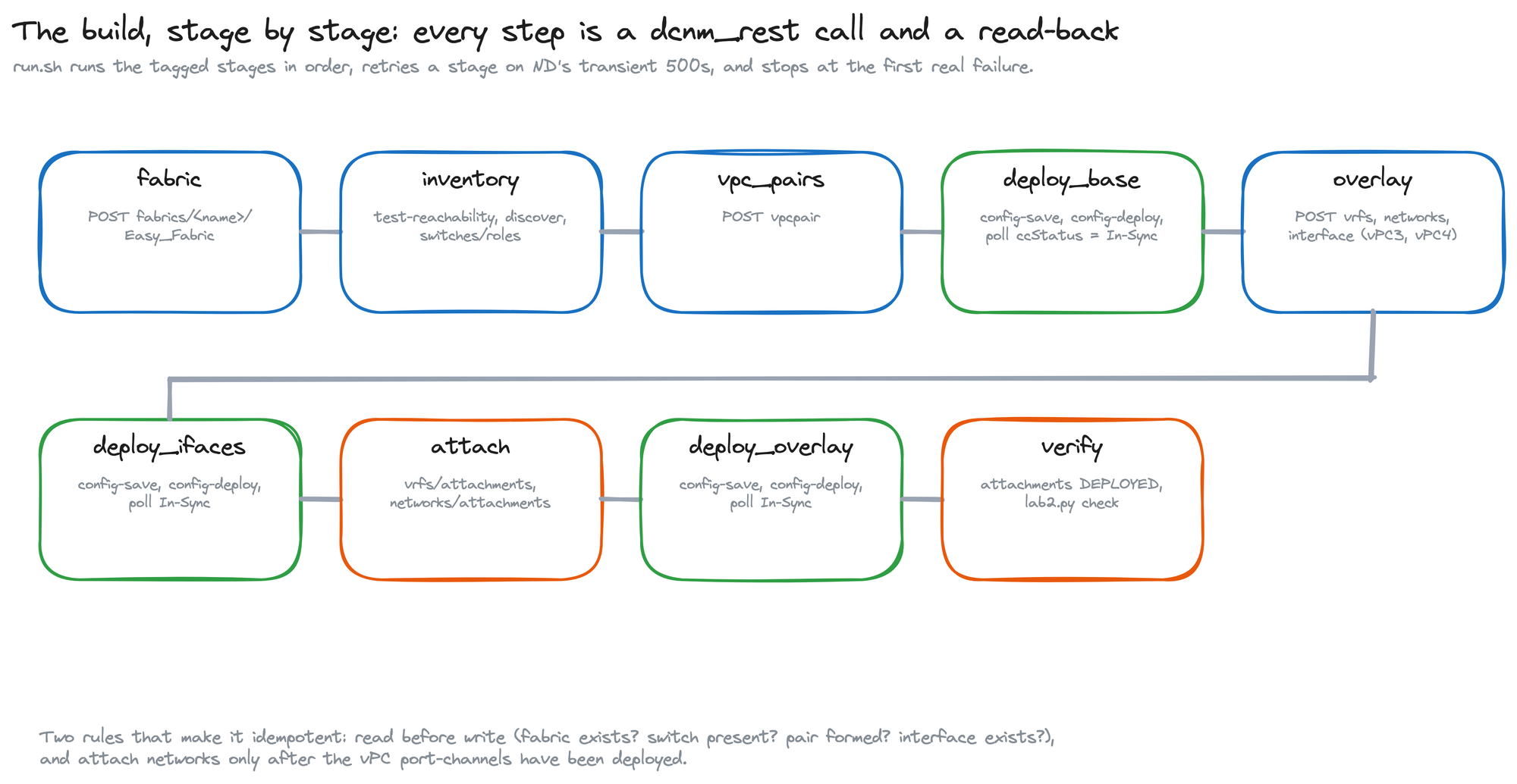
The GUI build in Part 2 has an order to it: fabric, switches, roles, pairs, deploy, overlay objects, host interfaces, deploy, attachments, deploy, verify. The playbook keeps that order as nine tagged stages. A small runner script executes the stages you name, in sequence, and retries a stage when the controller answers with one of its transient gateway errors; in my recorded runs those were "problem proxying the request" and "context deadline exceeded". Only the three deploy stages touch a switch. Everything else is intent stored in NDFC.
What the playbook talks to
Every task uses the dcnm_rest module from the cisco.dcnm collection. It sends a method, a path and a JSON body to the controller and hands back the response, and that is all it does. The collection also ships purpose-built modules for fabrics, inventory, vPC pairs, VRFs, networks and interfaces, and I tried those first. With cisco.dcnm 3.13 against this controller, the fabric and inventory modules died with a Python error before making their call, 'str' object has no attribute 'get'. So the playbook calls the same REST endpoints the GUI uses and reads the answers back itself. You write the request bodies and the read-backs; in return, every stage is one or two calls you can also fire by hand with curl when something looks off.
The fabric as data
The inventory points Ansible at the controller over the httpapi connection, with the admin password read from a file that lives outside the playbook folder. The group variables are the fabric itself: spines, leaves, vPC pairs, the VRF, the networks and the host-facing vPC interfaces. Every value there is one you typed into a GUI form in Part 2.