On this page
In Part 1 I laid out the blueprint: a leaf-spine VXLAN/EVPN fabric, Kubernetes with Cilium speaking BGP into it, and a pair of Active/Active firewalls on the edge, all virtual, all on one machine. This part is about that machine. Before a single switch boots, the host has to exist, be sized honestly, and hold the images the whole series builds from.
None of this is glamorous. It is also the part people most often get wrong, and the part that quietly decides whether your lab is a joy or a swap-thrashing regret.
What EVE-NG actually is
Strip the web UI away and EVE-NG is three ordinary things: a Linux server, a pile of QEMU/KVM virtual machines, and a Linux bridge for every cable you draw. That is the entire magic trick. When I drag a link between spine-1 and a leaf in the topology canvas, EVE creates a small bridge on the host and attaches one interface from each VM to it. When I connect a node to a "Cloud" network, that is a bridge too, except it is also bonded to a physical NIC, which is how the lab reaches the outside world.
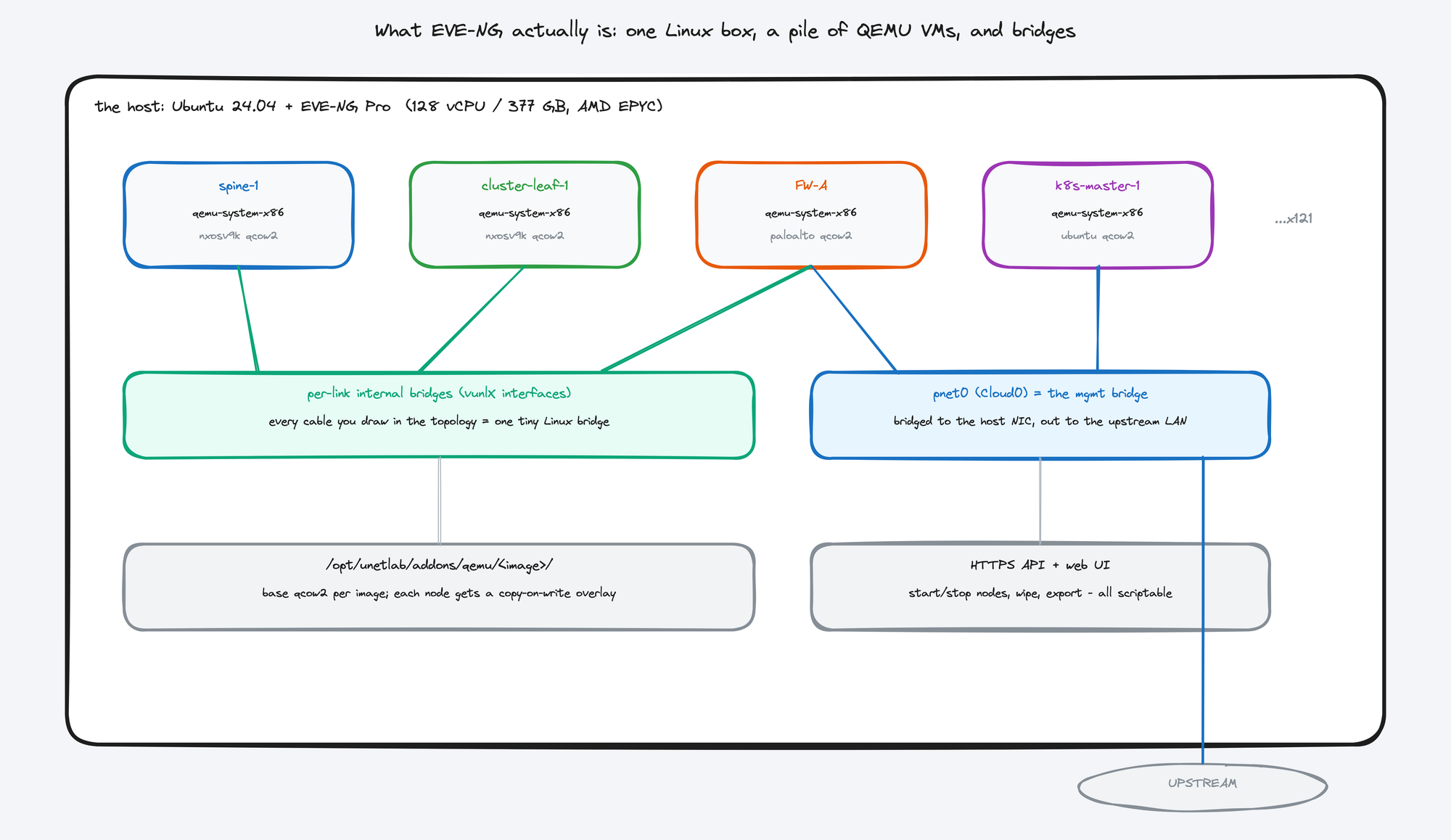
Internalizing this pays off for the rest of the series. When something misbehaves later, you are never debugging a mystery appliance. You can tcpdump a link's bridge on the host and see exactly what crossed the wire between two switches. The lab is transparent all the way down.